---
sidebar_label: Configurable HTTP ports
toc_max_heading_level: 3
doc_id: 3b8e2f1c-9a4d-4c7b-a5e3-2f1c8a9d4b6e
description: >-
Configure the main HTTP port for a Containers scope and expose additional
HTTP listeners, with the ALB capacity considerations that come with it.
keywords:
- containers
- kubernetes
- http port
- main_http_port
- additional ports
- ALB
- traffic manager
---
import Tabs from '@theme/Tabs';
import TabItem from '@theme/TabItem';
# Configurable HTTP ports
Containers scopes can bind the main HTTP listener to any port and expose extra HTTP ports alongside it. Both options live under the **Exposed Ports** section of the scope form.
## What it solves
Not every application binds to `8080`, and some need to expose more than one HTTP listener. With configurable HTTP ports you can:
- Pick the port your application binds to inside the container, with `8080` as the default
- Add extra HTTP listeners next to the main one, each with its own service and ingress
Typical use cases: a metrics endpoint on a different port, a webhook receiver, or a legacy app that binds to `9090` instead of `8080`.
## Prerequisites
The traffic-manager sidecar image must be version **1.5.0 or later**. Older images ignore the new `UPSTREAM_PORT` environment variable and continue to route to `8080`, which breaks any scope that sets a custom main HTTP port.
> ℹ️ Make sure the cluster pulls a compatible image before enabling the feature on production scopes.
## Configuration
### Main HTTP port
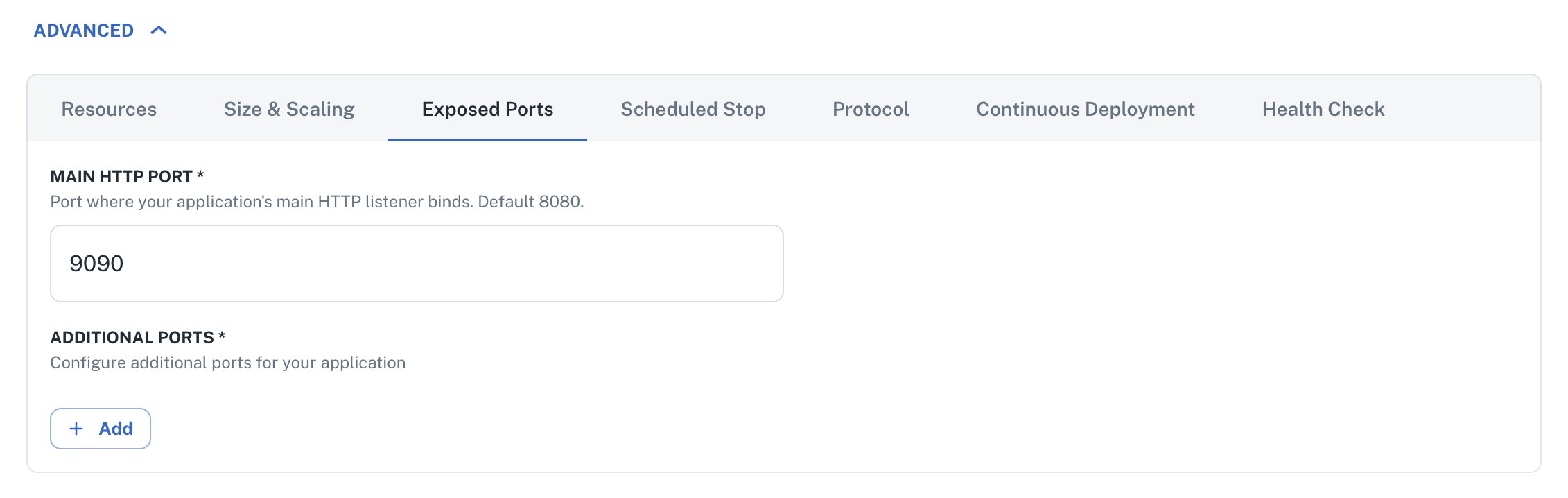
The `main_http_port` capability sets the port your application binds to inside the container. Nullplatform threads it through the Service, Ingress, container port, liveness/readiness/startup probes, and the traffic-manager sidecar automatically. No additional changes are required.
| Property | Value |
|---|---|
| Default | `8080` |
| Valid range | `1024` to `65535` |
| Required | Yes (default is applied if you don't set it) |
:::info
Ports below `1024` are reserved for privileged processes and are not allowed.
:::
Send a [PATCH request](/docs/api/scope-update) to update the scope capabilities:
1. Open the scope form in the nullplatform UI.
2. Under **ADVANCED → Exposed Ports**, set **Main HTTP Port** to the value your application binds to.
3. Save and deploy. The platform reconciles ingress, service, and probes automatically.
 ```bash
np scope patch --id 1234 --body '{
"capabilities": {
"main_http_port": 9090
}
}'
```
```bash
curl -L -X PATCH 'https://api.nullplatform.com/scope/1234' \
-H 'Content-Type: application/json' \
-H 'Authorization: Bearer ' \
-d '{
"capabilities": {
"main_http_port": 9090
}
}'
```
### HTTP additional ports
The `additional_ports` capability accepts entries of type `HTTP` (in addition to the existing `GRPC` type). Each HTTP additional port creates its own Service, Ingress, and traffic-manager sidecar.
The port becomes reachable externally over HTTPS at the same hostname as the scope, on the configured port. A scope at `https://my-app.example.com` with an additional port `9090` is reachable at `https://my-app.example.com:9090`. SSL termination happens at the ALB using the same wildcard certificate as the main listener, so no extra TLS configuration is required.
Existing GRPC additional ports keep working without changes.
1. Open the scope form in the nullplatform UI.
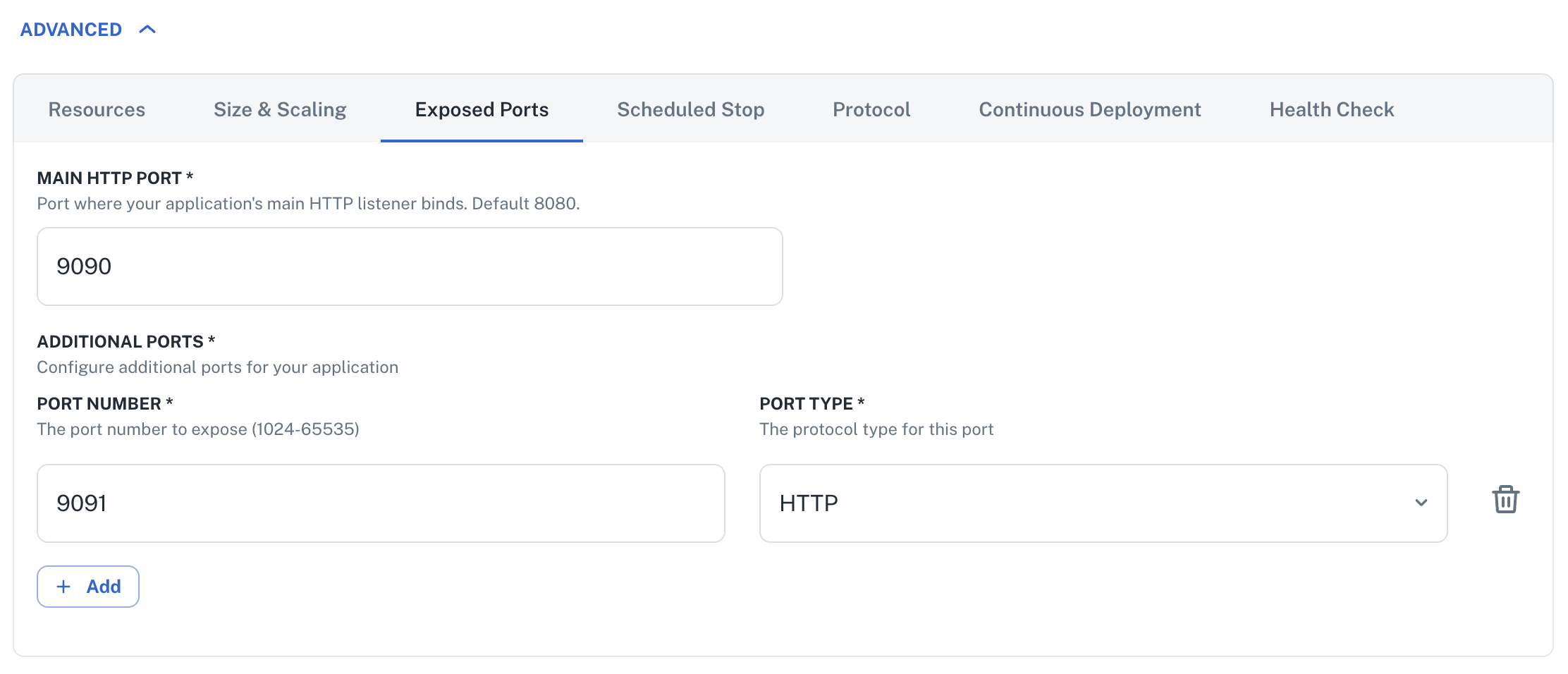
2. Under **ADVANCED → Exposed Ports → Additional Ports**, add an entry.
3. Set **type** to `HTTP` and **port** to the value your application binds to.
4. Save and deploy.
```bash
np scope patch --id 1234 --body '{
"capabilities": {
"main_http_port": 9090
}
}'
```
```bash
curl -L -X PATCH 'https://api.nullplatform.com/scope/1234' \
-H 'Content-Type: application/json' \
-H 'Authorization: Bearer ' \
-d '{
"capabilities": {
"main_http_port": 9090
}
}'
```
### HTTP additional ports
The `additional_ports` capability accepts entries of type `HTTP` (in addition to the existing `GRPC` type). Each HTTP additional port creates its own Service, Ingress, and traffic-manager sidecar.
The port becomes reachable externally over HTTPS at the same hostname as the scope, on the configured port. A scope at `https://my-app.example.com` with an additional port `9090` is reachable at `https://my-app.example.com:9090`. SSL termination happens at the ALB using the same wildcard certificate as the main listener, so no extra TLS configuration is required.
Existing GRPC additional ports keep working without changes.
1. Open the scope form in the nullplatform UI.
2. Under **ADVANCED → Exposed Ports → Additional Ports**, add an entry.
3. Set **type** to `HTTP` and **port** to the value your application binds to.
4. Save and deploy.
 ```bash
np scope patch --id 1234 --body '{
"capabilities": {
"main_http_port": 9090,
"additional_ports": [
{ "port": 9091, "type": "HTTP" }
]
}
}'
```
```bash
curl -L -X PATCH 'https://api.nullplatform.com/scope/1234' \
-H 'Content-Type: application/json' \
-H 'Authorization: Bearer ' \
-d '{
"capabilities": {
"main_http_port": 9090,
"additional_ports": [
{ "port": 9091, "type": "HTTP" }
]
}
}'
```
## ALB capacity considerations
Each additional port (HTTP or GRPC) opens a dedicated listener on the shared Application Load Balancer. The main scope ingress keeps using the standard `:80` and `:443` listeners, which are shared across all scopes by hostname. Additional ports are not shared between scopes: each port number gets its own listener.
AWS enforces a hard quota of **50 listeners per ALB**. Nullplatform validates the listener count before each deployment and rejects the deploy if it would exceed `ALB_MAX_LISTENERS` (default `48`, which leaves 2 slots of safety margin).
If a deploy fails with a listener capacity error, the options are:
- Reduce the number of additional ports across the scopes sharing the ALB
- Move one or more scopes to a separate ALB
- Request an AWS service-quota increase for listeners per ALB (limited adjustability)
:::info
Listeners are cleaned up automatically. The AWS Load Balancer Controller owns the listener lifecycle: when the last Ingress referencing a particular listener is deleted, the controller removes it from the ALB. Deleting a deployment is enough to reclaim its listener slots. If multiple scopes share the same additional port number on the same ALB, the listener stays until all of them are deleted.
:::
## Backward compatibility
The change is fully backward-compatible:
- Scopes that don't set `main_http_port` keep using `8080` everywhere. No migration is required.
- Existing additional ports configured as `GRPC` continue to work without changes.
- The traffic-manager image defaults `UPSTREAM_PORT` to `8080` when the env is missing, so an upgraded image with un-upgraded scope templates behaves like the old image.
## Next steps
- [Containers scope overview](/docs/agent-backed-scopes/containers): cluster setup, supported providers, and the full feature list
- [CPU and memory limits](/docs/agent-backed-scopes/containers/cpu-and-memory-limits): configure resource requests and limits for the Containers scope
- [Scope configurations](/docs/agent-backed-scopes/scope-configurations): manage namespace, networking, deployment, and security settings
```bash
np scope patch --id 1234 --body '{
"capabilities": {
"main_http_port": 9090,
"additional_ports": [
{ "port": 9091, "type": "HTTP" }
]
}
}'
```
```bash
curl -L -X PATCH 'https://api.nullplatform.com/scope/1234' \
-H 'Content-Type: application/json' \
-H 'Authorization: Bearer ' \
-d '{
"capabilities": {
"main_http_port": 9090,
"additional_ports": [
{ "port": 9091, "type": "HTTP" }
]
}
}'
```
## ALB capacity considerations
Each additional port (HTTP or GRPC) opens a dedicated listener on the shared Application Load Balancer. The main scope ingress keeps using the standard `:80` and `:443` listeners, which are shared across all scopes by hostname. Additional ports are not shared between scopes: each port number gets its own listener.
AWS enforces a hard quota of **50 listeners per ALB**. Nullplatform validates the listener count before each deployment and rejects the deploy if it would exceed `ALB_MAX_LISTENERS` (default `48`, which leaves 2 slots of safety margin).
If a deploy fails with a listener capacity error, the options are:
- Reduce the number of additional ports across the scopes sharing the ALB
- Move one or more scopes to a separate ALB
- Request an AWS service-quota increase for listeners per ALB (limited adjustability)
:::info
Listeners are cleaned up automatically. The AWS Load Balancer Controller owns the listener lifecycle: when the last Ingress referencing a particular listener is deleted, the controller removes it from the ALB. Deleting a deployment is enough to reclaim its listener slots. If multiple scopes share the same additional port number on the same ALB, the listener stays until all of them are deleted.
:::
## Backward compatibility
The change is fully backward-compatible:
- Scopes that don't set `main_http_port` keep using `8080` everywhere. No migration is required.
- Existing additional ports configured as `GRPC` continue to work without changes.
- The traffic-manager image defaults `UPSTREAM_PORT` to `8080` when the env is missing, so an upgraded image with un-upgraded scope templates behaves like the old image.
## Next steps
- [Containers scope overview](/docs/agent-backed-scopes/containers): cluster setup, supported providers, and the full feature list
- [CPU and memory limits](/docs/agent-backed-scopes/containers/cpu-and-memory-limits): configure resource requests and limits for the Containers scope
- [Scope configurations](/docs/agent-backed-scopes/scope-configurations): manage namespace, networking, deployment, and security settings