---
sidebar_label: Environment setup
doc_id: 584e9f0d-867b-4702-8b3d-eb60cd54be6b
description: >-
Guide to setting up override environments in nullplatform for customizing
scopes and workflows.
keywords:
- nullplatform
- override environment
- scopes
- API keys
- notification channels
---
import Tabs from '@theme/Tabs';
import TabItem from '@theme/TabItem';
# Setting up your override environment
If you already have an **agent-backed scope** running and want to extend its behavior, you'll need to prepare your environment so that nullplatform can find and execute your custom logic.
This setup is required whether you're applying configuration tweaks or fully replacing workflows.
## 1. Choose a base scope to extend
Overrides are always built on top of an existing scope. This guide assumes you’re extending our [prod-ready Containers scope](https://github.com/nullplatform/scopes/tree/main/k8s), but you can use any agent-backed scope as your base.
> 💡 You won’t modify the base repository directly. Instead, you’ll reference it from your own override repository.
## 2. Prepare your override repository
Your override repository stores the configuration and workflow files that will extend the base scope.
Create a Git repository and include the following files:
- `values.yaml` — for configuration (runtime value) overrides.
- Workflow files — for behavior overrides (e.g., `create.yaml`, `deploy.yaml`).
Your repo might look like this:
```json
your-override-repo/
├── values.yaml
├── scope/workflows/
│ ├── create.yaml
│ └── delete.yaml
├── deployment/workflows/
│ └── initial.yaml
└── ...
```
> Each file in your override repo extends or replaces part of the base scope logic.
## 3. Update your notification channel
Your **notification channel** tells the agent when and where to run commands. Because you already have a channel configured for your base scope, you’ll only need to update it to include your override path.
This ensures the agent knows where to look for your custom workflows.
#### Update via the UI:
1. Go to **Platform settings > Notifications > Channels**.
2. Locate your existing **Agent** channel and click it to edit.
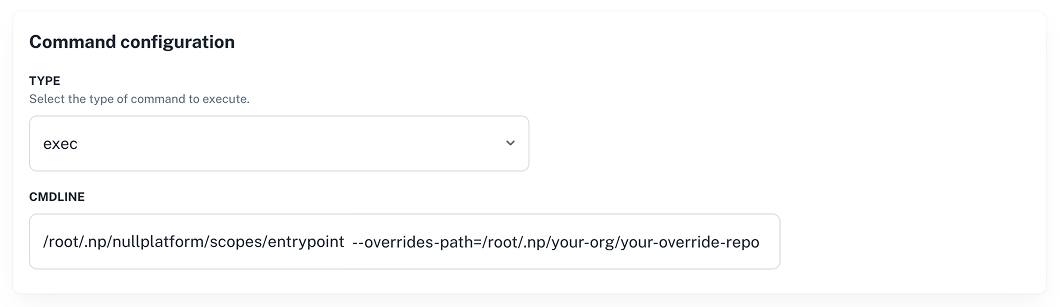
3. Scroll to the **Command configuration** section.
4. In **CMDLINE**, you’ll see your current base scope path—for example:
```bash
/root/.np/nullplatform/scopes/entrypoint
```
5. Add your override repository path to the command, using the `--overrides-path` flag:
```bash
/root/.np/nullplatform/scopes/entrypoint --overrides-path=/root/.np/your-org/your-override-repo
```
 Alternatively, you can update this channel through the [Notification channel API](/docs/api/notification-channel-update).
## 4. Update the agent configuration
Your **agent** must also know where your override code lives so it can clone and run your changes.
Set the following environment variables:
```bash
export NP_API_KEY=
export AGENT_TAGS=<"key:value">
export AGENT_REPO="https://git-provider/your-org/your-override-repo.git#main,https://github.com/nullplatform/scopes.git#main"
```
Then, upgrade the running agent using Helm:
```bash
helm upgrade nullplatform-agent nullplatform/nullplatform-agent \
--set configuration.values.NP_API_KEY=$NP_API_KEY \
--set configuration.values.TAGS="$AGENT_TAGS" \
--set configuration.values.AGENT_REPO=$AGENT_REPO
```
You should see a message like this once the agent reconnects:
```bash
{"level":"info","time":"2025-08-05T16:40:56.721Z","message":"Commands Executor connected"}
```
> For more info on the nullplatform agent, check our [Agent docs](/docs/agent/overview).
## You’re ready to apply overrides
Once your agent is running and the channel is configured, your custom logic will be picked up and applied during
scope execution.
From here, you can:
- [Tweak configuration values](/docs/agent-backed-scopes/overrides/configuration.md)
- [Modify workflows or logic](/docs/agent-backed-scopes/overrides/behavior.md)
Alternatively, you can update this channel through the [Notification channel API](/docs/api/notification-channel-update).
## 4. Update the agent configuration
Your **agent** must also know where your override code lives so it can clone and run your changes.
Set the following environment variables:
```bash
export NP_API_KEY=
export AGENT_TAGS=<"key:value">
export AGENT_REPO="https://git-provider/your-org/your-override-repo.git#main,https://github.com/nullplatform/scopes.git#main"
```
Then, upgrade the running agent using Helm:
```bash
helm upgrade nullplatform-agent nullplatform/nullplatform-agent \
--set configuration.values.NP_API_KEY=$NP_API_KEY \
--set configuration.values.TAGS="$AGENT_TAGS" \
--set configuration.values.AGENT_REPO=$AGENT_REPO
```
You should see a message like this once the agent reconnects:
```bash
{"level":"info","time":"2025-08-05T16:40:56.721Z","message":"Commands Executor connected"}
```
> For more info on the nullplatform agent, check our [Agent docs](/docs/agent/overview).
## You’re ready to apply overrides
Once your agent is running and the channel is configured, your custom logic will be picked up and applied during
scope execution.
From here, you can:
- [Tweak configuration values](/docs/agent-backed-scopes/overrides/configuration.md)
- [Modify workflows or logic](/docs/agent-backed-scopes/overrides/behavior.md)