Channels
Channels define where notifications are delivered. Configure them via the UI, CLI, or API to route events to:
- Slack: receive messages in specific channels for approvals or alerts
- HTTP Webhooks: process events programmatically with custom logic (e.g., auto-approve deployments during business hours)
- GitHub, GitLab, Azure, and Bitbucket: trigger CI/CD workflows as part of your service provisioning process
- Agent: execute commands inside your own infrastructure
Each channel listens to one or more sources that determine which events it receives. See Sources & actions for the full reference of available sources and actions.
This page covers channel creation. To list, update, or delete existing channels, see Manage channels.
Go to Platform settings > Notifications > Channels and click + New channel.
Slack
To receive notifications on Slack, you'll need to:
-
Install nullplatform's Slack application
Go tohttps://<your-org-slug>.app.nullplatform.io/integrationand click Connect Slack to authorize the application. -
In Slack, invite the nullplatform application to the channels where you want to receive notifications
You can do this with the slash command/invite @nullplatform. -
Set notification channels for your teams, applications, etc.
To create a notification channel for Slack, you can use the UI, the nullplatform CLI, or send a POST request to create a channel.
If multiple teams need notifications (e.g., different approvers per team), create a separate notification channel for each team by specifying the corresponding NRN.
Example request:
- UI (Recommended)
- CLI
- cURL
The easiest way to create a Slack notification channel is through the UI.
- Go to Platform settings → Notifications → Channels.
- Click + New channel.
- Fill in the required fields:
- Description: A human-readable description to help you identify the channel, for example: My Slack channel for approval notifications
- Source: The entity whose activity you want to listen to, for example: approval
- Channel type: Select Slack, then enter the Slack channel name, for example: my-organization-private-channel
- Resource (NRN): Select the resource that will trigger the notifications.
- Filters: Define which events should generate notifications by filtering the incoming data, for example: action equals deployment:create
- Click Create channel to create the notification channel.
curl -L -X POST 'https://api.nullplatform.com/notification/channel' \
-H 'Content-Type: application/json' \
-H 'Accept: application/json' \
-H 'Authorization: Bearer <token>' \
-d '{
   "nrn": "organization=1:account=2:namespace=3:application=4",   // The NRN of the resource where the action will apply.
   "description": "My Slack channel for approval notifications",
   "source": [
      "approval"
   ],
   "type": "slack",
   "configuration": {
      "channels": [
         "my-organization-private-channel"
      ]
   },
   "filters": {
      "action": "deployment:create"
   }
}'
This endpoint returns an ID that you can later use to reconfigure or delete the notification channel using PATCH or DELETE
requests.
np notification channel create \
   --body '{
   "nrn": "organization=1:account=2:namespace=3:application=4",  // The NRN of the resource where the action will apply.
   "description": "My Slack channel for approval notifications",
   "source": [
      "approval"
      ],
   "type": "slack",
   "configuration": {
      "channels": [
         "my-organization-private-channel"
      ]
   },
   "filters": {
      "action": "deployment:create"
   }
}'
This endpoint returns an ID that you can later use to reconfigure or delete the notification channel using PATCH or DELETE
requests.
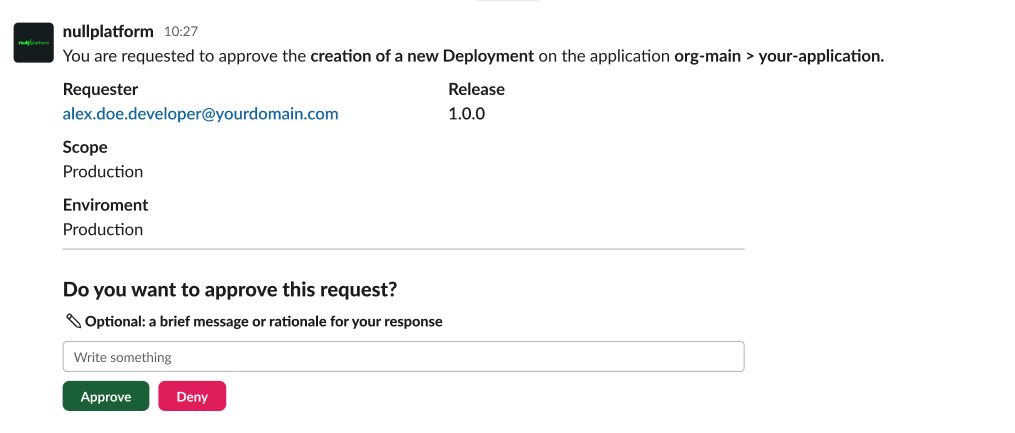
Once configured, you’ll receive Slack messages to approve or deny requests.
Here's an example:
Agent
Agent notification channels let you trigger actions inside your infrastructure in response to platform events. When an event matches the channel's source and filters, nullplatform sends the notification to the nullplatform agent, which executes a command on your machine.
Prerequisites
- The nullplatform agent installed and connected
- An Admin, Ops, or SecOps role, so nullplatform can create the channel's credential for you. See Channel credential
Configuration fields
The configuration object for an agent channel has three parts:
| Field | Required | Description |
|---|---|---|
api_key | No | Your own API key for the channel. Leave it out, and nullplatform creates and manages the credential. See Channel credential |
command | Yes | The command the agent executes when a notification arrives. See details below |
selector | Yes | Key-value tags used to route the notification to the right agent instance. The tags must match the agent's AGENT_TAGS. For example, { "environment": "production" } routes only to agents tagged with environment=production |
The command object
| Field | Required | Description |
|---|---|---|
command.type | Yes | The execution type. Currently only exec is supported |
command.data.cmdline | Yes | The command line to execute. The path must point to a valid executable on the agent's machine (e.g., /root/.np/nullplatform/scopes/entrypoint). You can include flags like --service-path="$SERVICE_PATH" or --overrides-path=/path/to/your/repo |
command.data.environment | No | Environment variables passed to the command. Use ${NOTIFICATION_CONTEXT} to inject the full notification payload as a JSON string |
command.data.arguments | No | An array of additional arguments passed to the command |
The ${NOTIFICATION_CONTEXT} variable is key for agent channels. It contains the full notification payload as a JSON string, which your script can parse to determine what action to take. Assign it to an environment variable like NP_ACTION_CONTEXT so your entrypoint can read it.
Channel credential
The channel needs a credential to send commands to your agents. By default, nullplatform creates and manages it: leave api_key out, and nullplatform creates an API key that can only dispatch commands to your agents, with the controlplane:agent-dispatcher role on the channel's NRN. There's nothing to generate or rotate, and deleting the channel revokes the key.
To create a channel this way, you need a role that can assign controlplane:agent-dispatcher: Admin, Ops, or SecOps. Without it, the request fails with a 403 and nothing is created.
Nullplatform manages the credential with your permissions. Deleting the channel, or switching it to your own key, revokes the credential as you: if you can't revoke it, the request fails with a 403 and the channel stays as it was. If you move the channel to another NRN, the credential moves with it.
To use your own key instead, send it in api_key. An empty api_key is rejected, so either send a key or leave the field out.
You can switch an existing channel from one mode to the other, and it keeps its ID:
- From your own key to a managed credential: update the channel with a
configurationthat has noapi_key. Nullplatform doesn't revoke your old key, so delete it from Platform settings > API keys if nothing else uses it. - From a managed credential to your own key: update the channel with your key in
api_key. Nullplatform revokes the managed credential.
api_key when you update a channel that uses your own keyAn update that sends configuration replaces the whole object. If the channel uses your own key and the new configuration has no api_key, the channel switches to a platform-managed credential. Updates that don't send configuration, like a change to filters, leave the credential as it is.
Example request
- UI (Recommended)
- CLI
- cURL
- Go to Platform settings > Notifications > Channels.
- Click + New channel.
- Fill in the required fields:
- Description: a human-readable name, for example: Agent channel for service provisioning
- Source: the event source, for example: service and telemetry
- Channel type: select Agent
- Credential: keep Platform-managed credential (recommended), or choose Use my own API key and paste your key
- Command: set the command type to exec, enter the command line path, and add environment variables (e.g.,
NP_ACTION_CONTEXT=${NOTIFICATION_CONTEXT}) - Selector: enter the key-value tags that match your agent's
AGENT_TAGS(e.g.,environment=local) - Resource (NRN): select the resource that will trigger the notifications
- Filters: optionally filter which events trigger the command
- Click Create channel.
np notification channel create \
  --body '{
    "nrn": "organization=1:account=2:namespace=3:application=4",
    "description": "Agent channel for service provisioning",
    "type": "agent",
    "source": ["service", "telemetry"],
    "configuration": {
      "command": {
        "type": "exec",
        "data": {
          "cmdline": "/root/.np/nullplatform/scopes/entrypoint --service-path=\"$SERVICE_PATH\"",
          "environment": {
            "NP_ACTION_CONTEXT": "${NOTIFICATION_CONTEXT}"
          }
        }
      },
      "selector": {
        "environment": "local"
      }
    },
    "filters": {
      "service.specification.slug": "my-service-spec"
    }
  }'
curl -L -X POST 'https://api.nullplatform.com/notification/channel' \
  -H 'Content-Type: application/json' \
  -H 'Accept: application/json' \
  -H 'Authorization: Bearer <token>' \
  -d '{
    "nrn": "organization=1:account=2:namespace=3:application=4",
    "description": "Agent channel for service provisioning",
    "type": "agent",
    "source": ["service", "telemetry"],
    "configuration": {
      "command": {
        "type": "exec",
        "data": {
          "cmdline": "/root/.np/nullplatform/scopes/entrypoint --service-path=\"$SERVICE_PATH\"",
          "environment": {
            "NP_ACTION_CONTEXT": "${NOTIFICATION_CONTEXT}"
          }
        }
      },
      "selector": {
        "environment": "local"
      }
    },
    "filters": {
      "service.specification.slug": "my-service-spec"
    }
  }'
For a detailed guide on using agent channels with scopes and custom overrides, see Set up an agent notification channel and Override environment setup.
HTTP webhook
HTTP webhooks let external systems receive and process notification events programmatically. Use them to implement custom logic, such as "approve this deployment only if it's business hours and the card is marked as verified by QA".
Configure nullplatform to send POST requests to your custom endpoint using either our API or the CLI.
Embed any token or secret directly in the URL or headers. We currently do not support a refresh token scheme.
- UI (Recommended)
- CLI
- cURL
The easiest way to create an HTTP notification channel is through the UI.
- Go to Platform settings → Notifications → Channels.
- Click + New channel.
- Fill in the required fields:
- Description: A human-readable description to help you identify the channel, for example: My HTTP channel for approval notifications
- Source: The entity whose activity you want to listen to, for example: telemetry and service.
- Channel type: Select HTTP, and enter the configuration URL and headers.
- Resource (NRN): Select the resource that will trigger the notifications.
- Filters: Define which events should generate notifications by filtering the incoming data.
- Click Create channel to create the notification channel.
curl -X POST "https://api.nullplatform.com/notification/channel" \
-H "Content-Type: application/json" \
-H "Accept: application/json" \
-d '{
   "source": ["approval"],
   "description": "My HTTP channel for approval notifications",
   "nrn": "organization=1:account=2:namespace=3:application=4",
   "type": "http",
   "configuration": {
      "url": "https://yourdomain.com/your-configured-endpoint",
      "headers": {
         "Authorization": "Bearer the-token"
      }
   }
}'
np notification channel create \
   --body '{
      "source": ["approval"],
      "nrn": "organization=1:account=2:namespace=3:application=4",
      "description": "My HTTP channel for approval notifications",
      "type": "http",
      "configuration": {
         "url": "https://yourdomain.com/your-configured-endpoint",
         "headers": {
            "Authorization": "Bearer the-token"
         }
      }
   }'
Your endpoint must respond within 10 seconds. If it doesn't, the delivery is marked as failed and retried up to 5 times with exponential backoff.
This means a single event can appear multiple times in your notification history. To handle duplicates, use the message_id field in the payload, which stays the same across all retry attempts for the same event.
After setting up your custom notification channel, you'll start receiving POST requests to your endpoint. The payload structure varies by source:
{
  "id": 123,
  "source": "approval",
  "created_at": "2022-12-19T20:37:42.109Z",
  "notification": {
      "approval_id": 1234,
      "approve_url": "https://api.nullplatform.com/approval/1234/approve?token=the-token",
      "deny_url": "https://api.nullplatform.com/approval/1234/deny?token=the-token",
      "requested_by": {
        "user_id": 1,
        "email": "alex.doe.developer@yourdomain.com",
        "first_name": "alex",
        "last_name": "doe",
        "avatar": null
      },
      "action": "deployment:create",
      "details": {...}
  }
}
{
  "entity_context": {
    "organization_id": 1,
    "account_id": 2,
    "namespace_id": 3,
    "application_name": "Acme Test App",
    "application_slug": "acme-test-app"
  },
  "user_email": "alex.doe.developer@domain.com",
  "user_type": "person",
  "entity": "application",
  "entity_id": "4",
  "method": "PATCH",
  "status": 204,
  "url": "/application/4",
  "entity_data": { ... },
  "request_body": { "name": "Acme Test App" },
  "date": "2025-05-18T08:47:19.984Z",
  "messageId": "abc-7d2fe831-a3b9-495c-9f17-3a8a123bfc6c"
}
The messageId field is stable across retry attempts — use it to deduplicate events if your endpoint fails to respond within the 10-second window and nullplatform retries the delivery.
GitHub
GitHub channels trigger GitHub Actions workflows in response to platform events. They're typically used with the service source to run provisioning pipelines when service actions are created.
You need a GitHub App installation configured for your organization. See GitHub configuration for setup instructions.
- UI (Recommended)
- CLI
- cURL
- Go to Platform settings > Notifications > Channels.
- Click + New channel.
- Fill in the required fields:
- Description: A human-readable description, for example: GitHub workflow for service provisioning
- Source: The event source, for example: service
- Channel type: Select GitHub, then fill in the GitHub configuration fields.
- Resource (NRN): Select the resource that will trigger the notifications.
- Filters: Optionally filter which events trigger the workflow.
- Click Create channel.
np notification channel create \
  --body '{
    "nrn": "organization=1:account=2:namespace=3:application=4",
    "description": "GitHub workflow for service provisioning",
    "source": ["service"],
    "type": "github",
    "configuration": {
      "installation_id": "12345678",
      "account": "my-github-org",
      "repository": "services-opentofu",
      "reference": "main",
      "workflow_id": "provisioning.yml"
    },
    "filters": {
      "service.specification.slug": "my-service-spec"
    }
  }'
curl -L -X POST 'https://api.nullplatform.com/notification/channel' \
  -H 'Content-Type: application/json' \
  -H 'Accept: application/json' \
  -H 'Authorization: Bearer <token>' \
  -d '{
    "nrn": "organization=1:account=2:namespace=3:application=4",
    "description": "GitHub workflow for service provisioning",
    "source": ["service"],
    "type": "github",
    "configuration": {
      "installation_id": "12345678",
      "account": "my-github-org",
      "repository": "services-opentofu",
      "reference": "main",
      "workflow_id": "provisioning.yml"
    },
    "filters": {
      "service.specification.slug": "my-service-spec"
    }
  }'
Configuration fields:
| Field | Description |
|---|---|
installation_id | The GitHub App installation ID for your organization |
account | The GitHub organization or user account that owns the repository |
repository | The repository containing the workflow file |
reference | The git branch to use (e.g., main) |
workflow_id | The workflow file name (e.g., provisioning.yml) |
GitLab
GitLab channels trigger CI/CD pipelines in response to platform events. Like GitHub channels, they're commonly used with the service source for provisioning workflows.
You need a GitLab integration configured for your organization. See GitLab configuration for setup instructions.
- UI (Recommended)
- CLI
- cURL
- Go to Platform settings > Notifications > Channels.
- Click + New channel.
- Fill in the required fields:
- Description: A human-readable description, for example: GitLab pipeline for service provisioning
- Source: The event source, for example: service
- Channel type: Select GitLab, then enter the project ID and reference branch.
- Resource (NRN): Select the resource that will trigger the notifications.
- Filters: Optionally filter which events trigger the pipeline.
- Click Create channel.
np notification channel create \
  --body '{
    "nrn": "organization=1:account=2:namespace=3:application=4",
    "description": "GitLab pipeline for service provisioning",
    "source": ["service"],
    "type": "gitlab",
    "configuration": {
      "project_id": "1234",
      "reference": "main"
    },
    "filters": {
      "service.specification.slug": "my-service-spec"
    }
  }'
curl -L -X POST 'https://api.nullplatform.com/notification/channel' \
  -H 'Content-Type: application/json' \
  -H 'Accept: application/json' \
  -H 'Authorization: Bearer <token>' \
  -d '{
    "nrn": "organization=1:account=2:namespace=3:application=4",
    "description": "GitLab pipeline for service provisioning",
    "source": ["service"],
    "type": "gitlab",
    "configuration": {
      "project_id": "1234",
      "reference": "main"
    },
    "filters": {
      "service.specification.slug": "my-service-spec"
    }
  }'
Configuration fields:
| Field | Description |
|---|---|
project_id | The GitLab project ID |
reference | The git branch to use (e.g., main) |
Azure DevOps
Azure DevOps channels trigger Azure Pipelines in response to platform events. They're used with the service source for provisioning workflows.
You need an Azure DevOps integration configured for your organization. See Azure DevOps configuration for setup instructions.
- UI (Recommended)
- CLI
- cURL
- Go to Platform settings > Notifications > Channels.
- Click + New channel.
- Fill in the required fields:
- Description: A human-readable description, for example: Azure pipeline for service provisioning
- Source: The event source, for example: service
- Channel type: Select Azure, then enter the organization, project, pipeline ID, and reference branch.
- Resource (NRN): Select the resource that will trigger the notifications.
- Filters: Optionally filter which events trigger the pipeline.
- Click Create channel.
np notification channel create \
  --body '{
    "nrn": "organization=1:account=2:namespace=3:application=4",
    "description": "Azure pipeline for service provisioning",
    "source": ["service"],
    "type": "azure",
    "configuration": {
      "organization": "my-azure-org",
      "project": "my-azure-project",
      "pipeline_id": 1234,
      "reference": "main"
    },
    "filters": {
      "service.specification.slug": "my-service-spec"
    }
  }'
curl -L -X POST 'https://api.nullplatform.com/notification/channel' \
  -H 'Content-Type: application/json' \
  -H 'Accept: application/json' \
  -H 'Authorization: Bearer <token>' \
  -d '{
    "nrn": "organization=1:account=2:namespace=3:application=4",
    "description": "Azure pipeline for service provisioning",
    "source": ["service"],
    "type": "azure",
    "configuration": {
      "organization": "my-azure-org",
      "project": "my-azure-project",
      "pipeline_id": 1234,
      "reference": "main"
    },
    "filters": {
      "service.specification.slug": "my-service-spec"
    }
  }'
Configuration fields:
| Field | Description |
|---|---|
organization | Your Azure DevOps organization name |
project | The Azure DevOps project name |
pipeline_id | The ID of the Azure Pipeline to trigger |
reference | The git branch to use (e.g., main) |
Bitbucket
Bitbucket channels trigger Bitbucket Pipelines in response to nullplatform events. Like the other repository channels, they're commonly used with the service source for provisioning workflows.
You need a Bitbucket Cloud integration configured for your organization, including the bot user's API token. The channel doesn't store credentials: it uses the ones from that integration. See Bitbucket configuration for setup instructions.
The channel runs a custom pipeline, one declared under pipelines: custom: in the repository's bitbucket-pipelines.yml. A custom pipeline runs only when a notification triggers it, never on push. Set pipeline to its name:
pipelines:
  custom:
    provisioning:
      - step:
          script:
            - echo "$CONTEXT"
Each run receives the notification payload as JSON in the CONTEXT pipeline variable.
- CLI
- cURL
np notification channel create \
  --body '{
    "nrn": "organization=1:account=2:namespace=3:application=4",
    "description": "Bitbucket pipeline for service provisioning",
    "source": ["service"],
    "type": "bitbucket",
    "configuration": {
      "workspace": "my-bitbucket-workspace",
      "repository": "services-opentofu",
      "reference": "main",
      "pipeline": "provisioning"
    },
    "filters": {
      "service.specification.slug": "my-service-spec"
    }
  }'
curl -L -X POST 'https://api.nullplatform.com/notification/channel' \
  -H 'Content-Type: application/json' \
  -H 'Accept: application/json' \
  -H 'Authorization: Bearer <token>' \
  -d '{
    "nrn": "organization=1:account=2:namespace=3:application=4",
    "description": "Bitbucket pipeline for service provisioning",
    "source": ["service"],
    "type": "bitbucket",
    "configuration": {
      "workspace": "my-bitbucket-workspace",
      "repository": "services-opentofu",
      "reference": "main",
      "pipeline": "provisioning"
    },
    "filters": {
      "service.specification.slug": "my-service-spec"
    }
  }'
See the create channel reference for the full request.
Configuration fields:
| Field | Required | Description |
|---|---|---|
workspace | Yes | The Bitbucket workspace that owns the repository |
repository | Yes | The repository containing bitbucket-pipelines.yml |
reference | Yes | The branch the pipeline runs on (e.g., main) |
pipeline | Yes | The name of the custom pipeline to trigger (e.g., provisioning) |
Next steps
- Sources and actions — understand which sources and actions are available for each channel type
- Apply filters to route specific events
- Manage existing channels
- Inspect event payloads