---
sidebar_label: Other agent-backed Storage
toc_max_heading_level: 3
doc_id: 0f94a676-5971-4c95-81cb-c6f4d53671d6
description: >-
Route parameter value lifecycle events to a handler your agent runs, so
you decide where parameter values are stored.
keywords:
- other agent-backed storage
- agent-backed storage
- external parameters
- parameters
- notification channel
- agent
- custom backend
- handler
---
import Tabs from '@theme/Tabs';
import TabItem from '@theme/TabItem';
# Set up Other agent-backed Storage
Other agent-backed Storage lets you keep parameter values in a backend you control — a cloud secret manager, an internal vault, a key-value store, anything reachable from your infrastructure — while nullplatform stays out of the data path. It's configured as a [provider](/docs/providers/overview), so it inherits the standard NRN and dimensions model.
## Why use Other agent-backed Storage
You'll typically reach for this when:
- A compliance requirement says secrets must stay inside a system you operate.
- You already have a secret manager and don't want to mirror values across systems.
- You want full control over how values are stored, retrieved, and audited, without nullplatform sitting in the data path.
- You want to layer custom logic (audit, replication, multi-region routing) on top of parameter operations.
:::note For everything else, the built-in storage is the right default.
Nothing about the developer experience changes when you flip Other agent-backed Storage on: parameter values still appear in the same place in the UI, and the CLI and API contract stay the same.
:::
## How it works
This backend doesn't store anything itself. It marks a `{NRN, dimensions}` tuple as "values for this tuple are handled outside nullplatform" and forwards every lifecycle event to a notification channel you configure. Your handler decides where the value lives, how it's read, and when it's deleted.
Three pieces work together:
1. **The provider**, which you create in nullplatform with the slug `agent-backed-storage`. It carries no attributes: its presence on a `{NRN, dimensions}` tuple is the signal.
2. **A notification channel** subscribed to the `parameter` source. It tells nullplatform where to send lifecycle events.
3. **Your handler**, executed by the agent on every lifecycle event. It reads the action and context the channel delivers, runs your logic, and returns a result to nullplatform.
```mermaid
%%{init: {'theme':'base','themeVariables':{
'fontFamily':'-apple-system, BlinkMacSystemFont, Segoe UI, sans-serif',
'primaryColor':'#274a86',
'primaryTextColor':'#ffffff',
'actorBkg':'#274a86',
'actorTextColor':'#ffffff',
'actorLineColor':'#cdd5e3',
'signalColor':'#0b1e3f',
'signalTextColor':'#0b1e3f',
'labelBoxBkgColor':'#00d4a8',
'labelBoxBorderColor':'#00b894',
'labelTextColor':'#0b1e3f',
'noteBkgColor':'#eef3fb',
'noteBorderColor':'#cdd5e3',
'noteTextColor':'#0b1e3f',
'sequenceNumberColor':'#ffffff'
}}}%%
sequenceDiagram
autonumber
participant Dev as 👤 Developer
participant API as Parameters API
participant Channel as Notification channel
participant Handler as Your handler
participant Store as Backend you control
rect rgb(238, 243, 251)
Dev->>+API: np parameter-value create
end
rect rgb(232, 248, 243)
API->>+Channel: parameter:store event
Channel->>+Handler: deliver action + context
end
rect rgb(245, 240, 250)
Handler->>+Store: write the value
Store-->>-Handler: ok
end
rect rgb(238, 243, 251)
Handler-->>-API: { external_id, metadata }
deactivate Channel
API-->>-Dev: parameter value created
end
```
The handler contract is action-based. Each lifecycle event triggers one of four actions: `parameter:store`, `parameter:retrieve`, `parameter:delete`, `parameter:notify`. Your handler responds with a small JSON payload that nullplatform validates and persists.
## Prerequisites
Before starting, make sure you have:
- A reachable agent running inside your infrastructure. See [Install the agent](/docs/agent/installation).
- An API key with the **Agent** role attached. See [Authenticate the agent](/docs/agent/authentication).
- The backend you'll write values to (cloud secret manager, internal vault, key-value store, etc.).
## Step 1: Create the provider
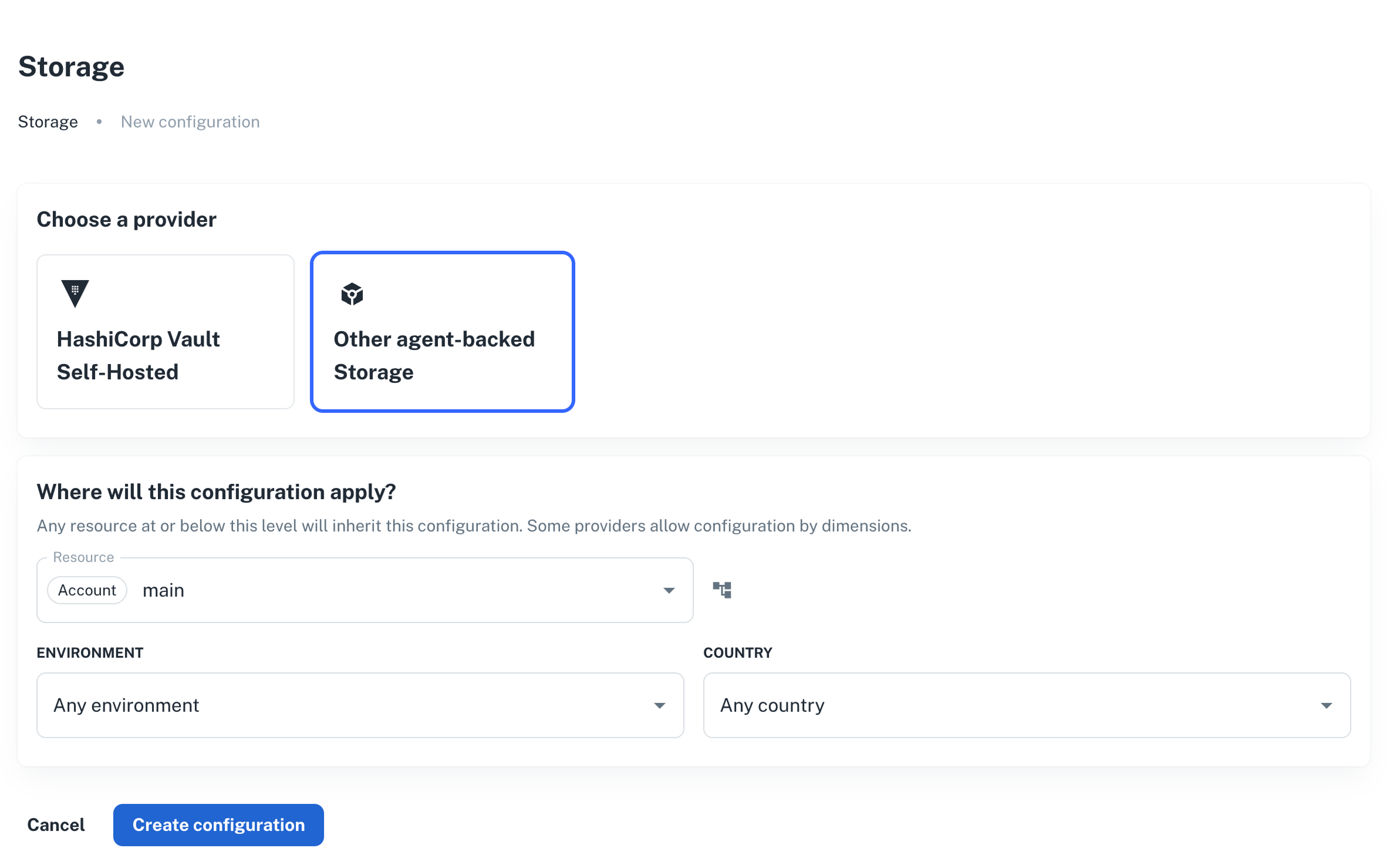
Create the marker provider on the NRN you want to route externally. It has no configurable attributes. Programmatic clients reference the provider by the spec slug `agent-backed-storage`.
1. Go to **Platform settings > Parameters & Secrets > Storage**, and click **+ New provider**.
2. Select **Other agent-backed Storage** and pick the resource (NRN) and any [dimensions](/docs/dimensions).
3. There are no fields to fill in.
4. Click **Create provider**.
 ```bash
np provider create \
--body '{
"nrn": "organization=1:account=2:namespace=3:application=4",
"specification_slug": "agent-backed-storage",
"dimensions": {},
"attributes": {}
}'
```
```hcl
data "nullplatform_provider_specification" "agent_backed_storage" {
slug = "agent-backed-storage"
}
resource "nullplatform_provider" "agent_backed_storage" {
nrn = "organization=1:account=2:namespace=3:application=4"
specification_id = data.nullplatform_provider_specification.agent_backed_storage.id
attributes = jsonencode({})
}
```
```bash
curl -L -X POST 'https://api.nullplatform.com/provider' \
-H 'Content-Type: application/json' \
-H 'Authorization: Bearer ' \
-d '{
"nrn": "organization=1:account=2:namespace=3:application=4",
"specification_slug": "agent-backed-storage",
"dimensions": {},
"attributes": {}
}'
```
The provider on its own doesn't do anything. The next step wires it up to your agent.
## Step 2: Create the notification channel
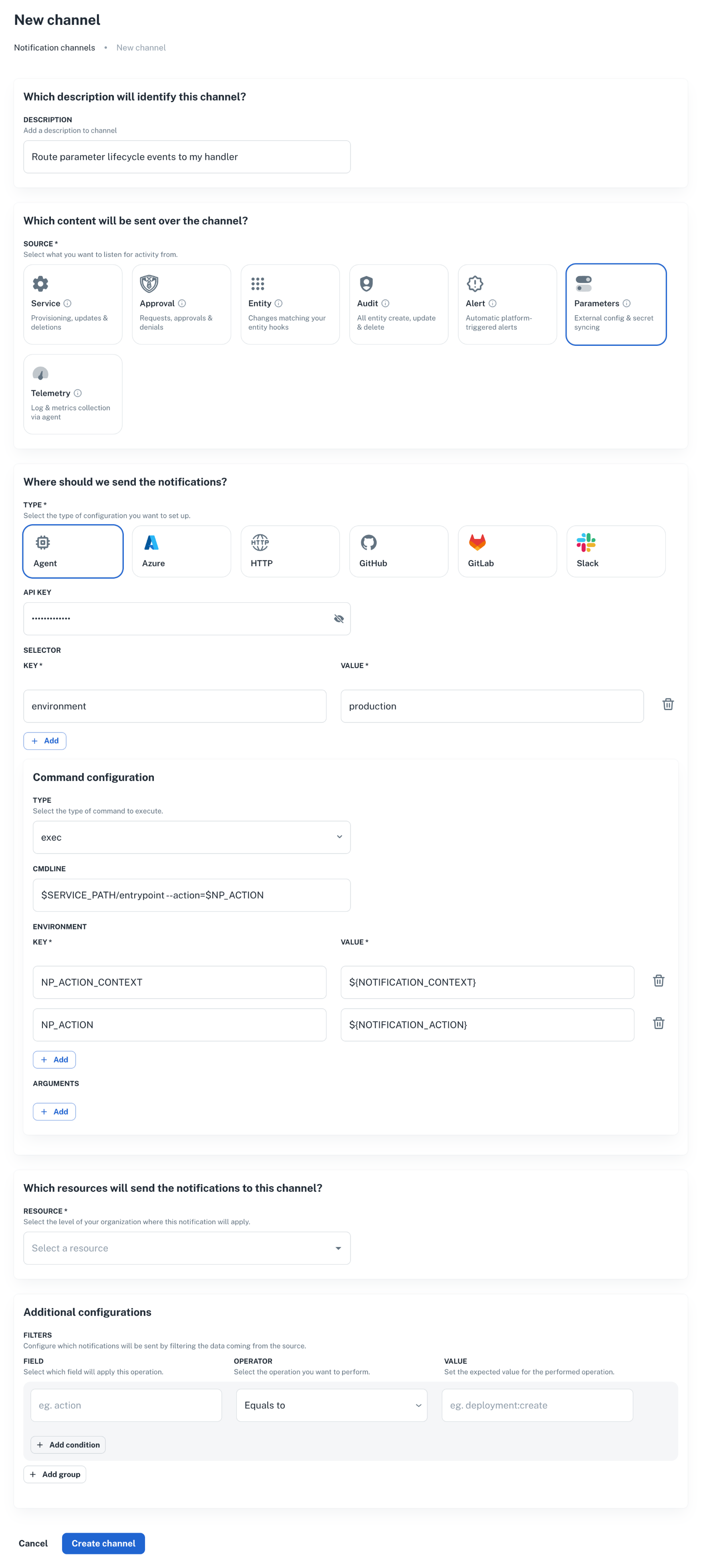
Create an agent channel that listens for parameter lifecycle events and runs your handler scripts. The same channel handles all four actions: nullplatform passes the action name in the notification context, and your handler dispatches accordingly.
1. Go to **Platform settings > Notifications > Channels**, and click **+ New channel**.
```bash
np provider create \
--body '{
"nrn": "organization=1:account=2:namespace=3:application=4",
"specification_slug": "agent-backed-storage",
"dimensions": {},
"attributes": {}
}'
```
```hcl
data "nullplatform_provider_specification" "agent_backed_storage" {
slug = "agent-backed-storage"
}
resource "nullplatform_provider" "agent_backed_storage" {
nrn = "organization=1:account=2:namespace=3:application=4"
specification_id = data.nullplatform_provider_specification.agent_backed_storage.id
attributes = jsonencode({})
}
```
```bash
curl -L -X POST 'https://api.nullplatform.com/provider' \
-H 'Content-Type: application/json' \
-H 'Authorization: Bearer ' \
-d '{
"nrn": "organization=1:account=2:namespace=3:application=4",
"specification_slug": "agent-backed-storage",
"dimensions": {},
"attributes": {}
}'
```
The provider on its own doesn't do anything. The next step wires it up to your agent.
## Step 2: Create the notification channel
Create an agent channel that listens for parameter lifecycle events and runs your handler scripts. The same channel handles all four actions: nullplatform passes the action name in the notification context, and your handler dispatches accordingly.
1. Go to **Platform settings > Notifications > Channels**, and click **+ New channel**.
 ```bash
np notification channel create \
--body '{
"nrn": "organization=1:account=2:namespace=3:application=4",
"source": ["parameter"],
"description": "Route parameter lifecycle events to my handler",
"type": "agent",
"configuration": {
"api_key": "AAAA.1234567890abcdef1234567890abcdefPTs=",
"command": {
"type": "exec",
"data": {
"cmdline": "$SERVICE_PATH/entrypoint --action=$NP_ACTION",
"environment": {
"NP_ACTION_CONTEXT": "${NOTIFICATION_CONTEXT}",
"NP_ACTION": "${NOTIFICATION_ACTION}"
}
}
},
"selector": {
"environment": "production"
}
},
"filters": {}
}'
```
```bash
curl -L 'https://api.nullplatform.com/notification/channel' \
-H 'Content-Type: application/json' \
-H 'Accept: application/json' \
-H 'Authorization: Bearer ' \
-d '{
"nrn": "organization=1:account=2:namespace=3:application=4",
"source": ["parameter"],
"description": "Route parameter lifecycle events to my handler",
"type": "agent",
"configuration": {
"api_key": "AAAA.1234567890abcdef1234567890abcdefPTs=",
"command": {
"type": "exec",
"data": {
"cmdline": "$SERVICE_PATH/entrypoint --action=$NP_ACTION",
"environment": {
"NP_ACTION_CONTEXT": "${NOTIFICATION_CONTEXT}",
"NP_ACTION": "${NOTIFICATION_ACTION}"
}
}
},
"selector": {
"environment": "production"
}
},
"filters": {}
}'
```
A few things to note:
- `source: ["parameter"]` is what makes this channel pick up parameter events. Don't add unrelated sources here; mixing them makes the handler harder to reason about.
- `selector` matches a tag on the agent. Make sure at least one of your agents declares the same tag, otherwise the event has nowhere to go.
- `filters` can narrow events further (for example, only events where `parameter.secret = true`). Leave it empty until you have a concrete reason to narrow it.
For the full channel reference, see [Set up an agent notification channel](/docs/agent/agent-channel).
## Step 3: Implement the handler
The agent runs your script for each lifecycle event. It passes:
- `NP_ACTION` (or whatever name you wired in `command.data.environment`): the action being processed (`parameter:store`, `parameter:retrieve`, `parameter:delete`, `parameter:notify`).
- `NP_ACTION_CONTEXT`: a JSON blob with the full notification context (parameter name, value, NRN, dimensions, scope, secret flag, etc.).
- `EXTERNAL_ID`: for `retrieve` and `delete`, the identifier returned by the previous `store` for the same value.
:::note
A working reference implementation lives in [nullplatform/scopes, under `k8s/parameters`](https://github.com/nullplatform/scopes/tree/ca00d3c07d62aa8971905083ce0d3d54062feed9/k8s/parameters). It targets HashiCorp Vault, but the action contract is identical regardless of where you write to — adapt the store/retrieve/delete/notify scripts to your backend's client.
:::
### What each action expects
#### `parameter:store`
Inputs (from `NP_ACTION_CONTEXT`):
```json
{
"notification": {
"parameter_id": 12345,
"parameter_name": "DB_PASSWORD",
"value": "the-actual-secret",
"secret": true,
"entities": { "application": "advertising-api", "scope": "prod-us" },
"value_entities": { "scope": "prod-us" },
"dimensions": { "environment": "production" }
}
}
```
Output:
```json
{
"external_id": "",
"metadata": {
"any": "extra info you want to keep alongside the reference"
}
}
```
The `external_id` is the only mandatory field. Nullplatform persists it as the value's reference and passes it back as `EXTERNAL_ID` for future `retrieve` and `delete` calls. Pick a deterministic identifier so the same `{parameter, scope, dimensions}` always resolves to the same record on your side.
#### `parameter:retrieve`
Inputs: `EXTERNAL_ID` env var set from the value's reference. The full context is also available in `NP_ACTION_CONTEXT`.
Output:
```json
{
"value": "the-actual-secret"
}
```
If the value is missing from your backend, return `{ "value": "value not found" }` and exit successfully. Nullplatform treats this as "deleted upstream" rather than as an error.
#### `parameter:delete`
Inputs: `EXTERNAL_ID`.
Output:
```json
{
"success": true
}
```
Treat a missing record as success: the value is already gone. This keeps deletes idempotent under retries.
#### `parameter:notify`
Fires after a value is stored. Useful for audit trails or downstream replication. If you don't need anything here, return `{ "success": true }` and move on. The Key Vault example is a no-op.
### Putting it together
A minimal entrypoint script looks like this:
```bash
#!/bin/bash
set -euo pipefail
case "$NP_ACTION" in
parameter:store)
"$SERVICE_PATH/store"
;;
parameter:retrieve)
"$SERVICE_PATH/retrieve"
;;
parameter:delete)
"$SERVICE_PATH/delete"
;;
parameter:notify)
"$SERVICE_PATH/notify"
;;
*)
echo "ERROR: unknown action $NP_ACTION" >&2
exit 1
;;
esac
```
The four sibling scripts each produce the JSON described above on stdout. Anything written to stderr is captured by the agent and surfaced in nullplatform's notification logs.
## Step 4: Verify the flow
Create a parameter value under the NRN you configured:
```bash
np parameter-value create \
--parameter \
--nrn organization=1:account=2:namespace=3:application=4 \
--value "test-value"
```
Then check, in this order:
1. **The notification log**. Each action should show up as a delivered notification. Failures appear with the stderr captured from your script.
2. **Your backend**. The value should be present, keyed by the `external_id` your `store` script returned.
3. **Read it back**. `np parameter-value read ` returns the value as if it lived in nullplatform. The retrieve action runs in the background to fetch it from your store.
If any step fails, see [Troubleshooting](#troubleshooting) below.
## Troubleshooting
### The notification never reaches my agent
- Check the channel `selector` matches a tag on at least one agent. A channel without a matching agent silently swallows events.
- Check `source: ["parameter"]` is set. A channel subscribed only to `service` or `telemetry` won't see parameter events.
- Inspect the channel and the agent in **Platform settings > Notifications > Channels**.
### `parameter:store` succeeds but reads return null
The `external_id` your `store` script returned was empty or `null`. Nullplatform stored an empty reference, so the subsequent retrieve has nothing to look up. Make sure `store` always emits `{"external_id": "..."}` with a non-empty string.
### Reads return values from the previous backend
If you migrated from internal storage, existing parameter values still point to the old location. Only values created after the provider exists go through your handler. Re-create the values you need in the new backend, or build a one-off migration that calls `parameter-value create` again.
### The handler script can't find `EXTERNAL_ID`
`EXTERNAL_ID` is only set for `retrieve` and `delete`. For `store` and `notify`, read everything from `NP_ACTION_CONTEXT` instead.
## Next steps
- [HashiCorp Vault Self-Hosted](/docs/parameters/hashicorp-vault-self-hosted): a typed variant of this flow specifically for Vault, where nullplatform forwards the Vault connection metadata to your handler.
- [Set up an agent notification channel](/docs/agent/agent-channel): full reference for the channel resource.
- [Reference handler in nullplatform/scopes](https://github.com/nullplatform/scopes/tree/ca00d3c07d62aa8971905083ce0d3d54062feed9/k8s/parameters): production-grade implementation for HashiCorp Vault, adaptable to any backend.
```bash
np notification channel create \
--body '{
"nrn": "organization=1:account=2:namespace=3:application=4",
"source": ["parameter"],
"description": "Route parameter lifecycle events to my handler",
"type": "agent",
"configuration": {
"api_key": "AAAA.1234567890abcdef1234567890abcdefPTs=",
"command": {
"type": "exec",
"data": {
"cmdline": "$SERVICE_PATH/entrypoint --action=$NP_ACTION",
"environment": {
"NP_ACTION_CONTEXT": "${NOTIFICATION_CONTEXT}",
"NP_ACTION": "${NOTIFICATION_ACTION}"
}
}
},
"selector": {
"environment": "production"
}
},
"filters": {}
}'
```
```bash
curl -L 'https://api.nullplatform.com/notification/channel' \
-H 'Content-Type: application/json' \
-H 'Accept: application/json' \
-H 'Authorization: Bearer ' \
-d '{
"nrn": "organization=1:account=2:namespace=3:application=4",
"source": ["parameter"],
"description": "Route parameter lifecycle events to my handler",
"type": "agent",
"configuration": {
"api_key": "AAAA.1234567890abcdef1234567890abcdefPTs=",
"command": {
"type": "exec",
"data": {
"cmdline": "$SERVICE_PATH/entrypoint --action=$NP_ACTION",
"environment": {
"NP_ACTION_CONTEXT": "${NOTIFICATION_CONTEXT}",
"NP_ACTION": "${NOTIFICATION_ACTION}"
}
}
},
"selector": {
"environment": "production"
}
},
"filters": {}
}'
```
A few things to note:
- `source: ["parameter"]` is what makes this channel pick up parameter events. Don't add unrelated sources here; mixing them makes the handler harder to reason about.
- `selector` matches a tag on the agent. Make sure at least one of your agents declares the same tag, otherwise the event has nowhere to go.
- `filters` can narrow events further (for example, only events where `parameter.secret = true`). Leave it empty until you have a concrete reason to narrow it.
For the full channel reference, see [Set up an agent notification channel](/docs/agent/agent-channel).
## Step 3: Implement the handler
The agent runs your script for each lifecycle event. It passes:
- `NP_ACTION` (or whatever name you wired in `command.data.environment`): the action being processed (`parameter:store`, `parameter:retrieve`, `parameter:delete`, `parameter:notify`).
- `NP_ACTION_CONTEXT`: a JSON blob with the full notification context (parameter name, value, NRN, dimensions, scope, secret flag, etc.).
- `EXTERNAL_ID`: for `retrieve` and `delete`, the identifier returned by the previous `store` for the same value.
:::note
A working reference implementation lives in [nullplatform/scopes, under `k8s/parameters`](https://github.com/nullplatform/scopes/tree/ca00d3c07d62aa8971905083ce0d3d54062feed9/k8s/parameters). It targets HashiCorp Vault, but the action contract is identical regardless of where you write to — adapt the store/retrieve/delete/notify scripts to your backend's client.
:::
### What each action expects
#### `parameter:store`
Inputs (from `NP_ACTION_CONTEXT`):
```json
{
"notification": {
"parameter_id": 12345,
"parameter_name": "DB_PASSWORD",
"value": "the-actual-secret",
"secret": true,
"entities": { "application": "advertising-api", "scope": "prod-us" },
"value_entities": { "scope": "prod-us" },
"dimensions": { "environment": "production" }
}
}
```
Output:
```json
{
"external_id": "",
"metadata": {
"any": "extra info you want to keep alongside the reference"
}
}
```
The `external_id` is the only mandatory field. Nullplatform persists it as the value's reference and passes it back as `EXTERNAL_ID` for future `retrieve` and `delete` calls. Pick a deterministic identifier so the same `{parameter, scope, dimensions}` always resolves to the same record on your side.
#### `parameter:retrieve`
Inputs: `EXTERNAL_ID` env var set from the value's reference. The full context is also available in `NP_ACTION_CONTEXT`.
Output:
```json
{
"value": "the-actual-secret"
}
```
If the value is missing from your backend, return `{ "value": "value not found" }` and exit successfully. Nullplatform treats this as "deleted upstream" rather than as an error.
#### `parameter:delete`
Inputs: `EXTERNAL_ID`.
Output:
```json
{
"success": true
}
```
Treat a missing record as success: the value is already gone. This keeps deletes idempotent under retries.
#### `parameter:notify`
Fires after a value is stored. Useful for audit trails or downstream replication. If you don't need anything here, return `{ "success": true }` and move on. The Key Vault example is a no-op.
### Putting it together
A minimal entrypoint script looks like this:
```bash
#!/bin/bash
set -euo pipefail
case "$NP_ACTION" in
parameter:store)
"$SERVICE_PATH/store"
;;
parameter:retrieve)
"$SERVICE_PATH/retrieve"
;;
parameter:delete)
"$SERVICE_PATH/delete"
;;
parameter:notify)
"$SERVICE_PATH/notify"
;;
*)
echo "ERROR: unknown action $NP_ACTION" >&2
exit 1
;;
esac
```
The four sibling scripts each produce the JSON described above on stdout. Anything written to stderr is captured by the agent and surfaced in nullplatform's notification logs.
## Step 4: Verify the flow
Create a parameter value under the NRN you configured:
```bash
np parameter-value create \
--parameter \
--nrn organization=1:account=2:namespace=3:application=4 \
--value "test-value"
```
Then check, in this order:
1. **The notification log**. Each action should show up as a delivered notification. Failures appear with the stderr captured from your script.
2. **Your backend**. The value should be present, keyed by the `external_id` your `store` script returned.
3. **Read it back**. `np parameter-value read ` returns the value as if it lived in nullplatform. The retrieve action runs in the background to fetch it from your store.
If any step fails, see [Troubleshooting](#troubleshooting) below.
## Troubleshooting
### The notification never reaches my agent
- Check the channel `selector` matches a tag on at least one agent. A channel without a matching agent silently swallows events.
- Check `source: ["parameter"]` is set. A channel subscribed only to `service` or `telemetry` won't see parameter events.
- Inspect the channel and the agent in **Platform settings > Notifications > Channels**.
### `parameter:store` succeeds but reads return null
The `external_id` your `store` script returned was empty or `null`. Nullplatform stored an empty reference, so the subsequent retrieve has nothing to look up. Make sure `store` always emits `{"external_id": "..."}` with a non-empty string.
### Reads return values from the previous backend
If you migrated from internal storage, existing parameter values still point to the old location. Only values created after the provider exists go through your handler. Re-create the values you need in the new backend, or build a one-off migration that calls `parameter-value create` again.
### The handler script can't find `EXTERNAL_ID`
`EXTERNAL_ID` is only set for `retrieve` and `delete`. For `store` and `notify`, read everything from `NP_ACTION_CONTEXT` instead.
## Next steps
- [HashiCorp Vault Self-Hosted](/docs/parameters/hashicorp-vault-self-hosted): a typed variant of this flow specifically for Vault, where nullplatform forwards the Vault connection metadata to your handler.
- [Set up an agent notification channel](/docs/agent/agent-channel): full reference for the channel resource.
- [Reference handler in nullplatform/scopes](https://github.com/nullplatform/scopes/tree/ca00d3c07d62aa8971905083ce0d3d54062feed9/k8s/parameters): production-grade implementation for HashiCorp Vault, adaptable to any backend.