Archive services and links New
Archiving is in early release and may not be available in your organization yet. If you'd like to try it or want to know more, reach out to us and we'll get you set up.
Archiving is a soft delete for services and links. An archived instance stops showing up in your service lists and its link parameters are removed, but the instance and all its attributes stay in nullplatform, so you can restore it whenever you need it.
Use archive when you're decommissioning gradually, pausing a service you may need again, or cleaning up lists without losing configuration. Hard delete is still available, with its usual guards, for when you're sure you won't need the service again.
How archiving works
When you archive a service or link:
- The instance moves to the
archivedstatus, andarchived_atrecords when it happened. - If the specification has an
archiveaction, nullplatform runs it so your infrastructure can react (for example, quarantining a queue or pausing a database). - For links, nullplatform removes the link's parameters from the application. Restoring the link recreates them from the service and link attributes as they are at restore time, not from a snapshot taken when you archived.
- The instance and its attributes stay stored and restorable at any time.
Restoring works the same way in reverse: the instance moves to updating and then back to active, running the unarchive action if the specification has one.
Rules and guards
| Rule | Detail |
|---|---|
| Archivable statuses | You can archive from active, failed, or cancelled. |
| Services with links | A service can only be archived when all of its links are already archived. |
| Restoring links | A link can only be restored while its parent service is active. |
| Deleting | Delete works on archived instances too. Deleting a service still requires removing its links first, including archived ones. |
| Duplicates | You can't create a service or link that matches an archived one (same specification, entity, and dimensions). The error names the archived instance, so you can restore it or delete it first. |
Archiving requires the ordinary write permission on the service, not the delete permission. Archive is recoverable, so it doesn't need the stricter permission that hard deletes require.
What happens to link parameters
Archiving a link removes its parameters from the application, and restoring it recreates them. Archiving doesn't keep a copy of the removed values: on restore, nullplatform rebuilds the parameters from the current attributes of the link and of its service.
If the service or link attributes changed while the link was archived, the restored parameters carry the current values, not the ones the link had when you archived it.
Archive and restore
Archiving is a status change: set the instance's status to archived, and back to active to restore it. You can do it from the UI, from the CLI, or with a PATCH request to the service or link API.
- UI
- CLI
- cURL
- Go to Platform settings and open Services → List.
- Find the service you want to archive and open its actions menu. Archive is only offered for services in
active,failed, orcancelledstatus. - Confirm in the dialog. It asks you to type
archive, and reminds you that all of the service's links must be archived or deleted first.
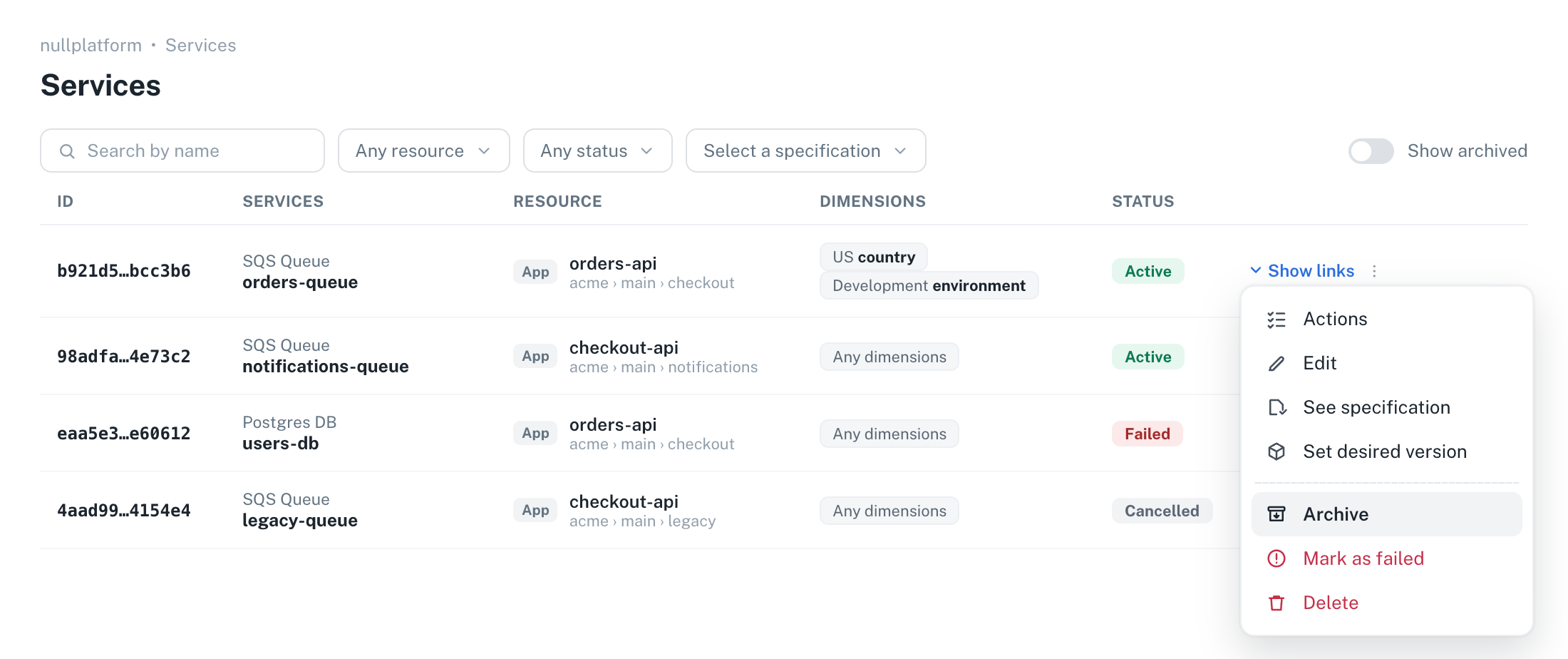
To restore a service, first bring the archived ones into view: turn on the Show archived toggle, or pick Archived in the status filter. The same actions menu then offers Restore, also behind a confirmation.
Links work the same way from the service's links list: Archive removes the link's parameters from the application, and Restore recreates them from the current service and link attributes. Restore is only available while the parent service is active.
Developers can also archive and restore from the Development view: open the application, go to Services, and use the actions menu under Owned by this application. The confirmation there is a plain dialog with no word to type, and it can show what archiving does to that particular service (see Explain what archiving does to your service).
While an instance is archiving, its status chip shows the operation in progress and destructive actions stay disabled until it finishes.
Archive a service by patching its status to archived:
np service patch \
  --id <SERVICE_ID> \
  --body '{ "status": "archived" }'
Restore it by patching the status back to active:
np service patch \
  --id <SERVICE_ID> \
  --body '{ "status": "active" }'
Links follow the same pattern with np link patch:
np link patch \
  --id <LINK_ID> \
  --body '{ "status": "archived" }'
Archive a service by patching its status to archived:
curl -L -X PATCH 'https://api.nullplatform.com/service/<SERVICE_ID>' \
-H 'Content-Type: application/json' \
-H 'Authorization: Bearer <token>' \
-d '{ "status": "archived" }'
Restore it by patching the status back to active:
curl -L -X PATCH 'https://api.nullplatform.com/service/<SERVICE_ID>' \
-H 'Content-Type: application/json' \
-H 'Authorization: Bearer <token>' \
-d '{ "status": "active" }'
Links follow the same pattern against /link/<LINK_ID>:
curl -L -X PATCH 'https://api.nullplatform.com/link/<LINK_ID>' \
-H 'Content-Type: application/json' \
-H 'Authorization: Bearer <token>' \
-d '{ "status": "archived" }'
If you manage your services as code, see OpenTofu/Terraform for archiving them from your configuration.
What happens after the request
Archiving resolves in one of three ways, depending on the specification. This mirrors how delete behaves:
- The specification has a managed
archiveaction → nullplatform creates and runs the action for you in the same request. The instance answers with statusarchiving(orupdatingon restore) and the action appears inactions_in_progress. - The specification has an unmanaged
archiveaction → the request returns400, and you run the archive action yourself, the same way you run any other service action. - The specification has no
archiveaction → the status changes directly, with the same guards applied.
An archive request can't include attributes (there is no workflow to apply them to). Other metadata fields in the same patch apply immediately.
A restore that resolves as a direct status change enforces the specification's required attributes, like any other direct write to active. If an archived instance has an incomplete attribute set, restore it through the unarchive action, or complete its attributes first.
Filtering archived instances
The API lists archived instances like any other status, so they show up when you list services or list links until you filter them out. Hiding them is what the UI's Show archived toggle does for you.
To list everything except archived instances, exclude them with status:ne:
curl -L 'https://api.nullplatform.com/service?nrn=<NRN>&status:ne=archived' \
-H 'Authorization: Bearer <token>'
To list only the archived ones, filter by status:
curl -L 'https://api.nullplatform.com/service?nrn=<NRN>&status=archived' \
-H 'Authorization: Bearer <token>'
Both filters work the same way against /link. The status:ne filter combines with status as an AND, so ?status=archived&status:ne=archived returns nothing. Fetching an instance by ID works regardless of its status.
Archiving also changes what the has_links filter returns. It counts only links that are neither archived nor deleted, so a service whose links are all archived comes back under ?has_links=false. A link that is still archiving counts as a link, because the operation hasn't landed yet.
Enable archive on your specifications
Whether archive runs a workflow depends on the service specification:
- New specifications created with
use_default_actionsget thearchiveaction generated automatically, alongside create, update, and delete. Theunarchiveaction is never auto-generated. - Existing specifications are never modified automatically. You opt in explicitly by creating the action specification, from the CLI or the API.
- CLI
- cURL
np service specification action specification create \
  --serviceSpecificationId <SPEC_ID> \
  --body '{
    "name": "Archive service",
    "type": "archive"
  }'
curl -L -X POST 'https://api.nullplatform.com/service_specification/<SPEC_ID>/action_specification' \
-H 'Content-Type: application/json' \
-H 'Authorization: Bearer <token>' \
-d '{
  "name": "Archive service",
  "type": "archive"
}'
Create a second one with "type": "unarchive" to run a workflow on restore too. Link specifications work the same way, through their own action specifications.
For specifications using default actions, nullplatform generates the action's parameters and results schemas from the specification's attributes and keeps them in sync on every specification update. Sending your own parameters or results returns a 400.
Once you've opted in, nullplatform owns the action's content: PATCH is refused, and DELETE is how you opt out. For agent-backed specifications (use_default_actions: false), you author both action types with your own schemas, like any other action.
Opt in to both archive and unarchive together. If only archive exists, archiving runs your workflow but restoring falls back to a direct status change, so nothing ever tells your infrastructure to undo the archive.
OpenTofu/Terraform
If you manage your specifications as code with the nullplatform IaC provider, the opt-in is a nullplatform_action_specification resource carrying only the name, the type, and the parent specification reference. Leave parameters and results out: nullplatform generates them, and sending your own is refused.
resource "nullplatform_action_specification" "unarchive_queue" {
  name                     = "Restore queue"
  type                     = "unarchive"
  service_specification_id = "<SPEC_ID>"
}
Use link_specification_id instead for a link specification.
Which of the two actions you declare depends on where the specification came from:
- Created with
use_default_actions: thearchiveaction already exists, so declaring it fails withThere is already an action of type archive. Adopt the generated one withterraform importif you want it in state, and declare onlyunarchive. - Created before archiving existed, or with
use_default_actions: false: neither action is generated, so declare both.
You don't need ignore_changes here. The provider treats parameters and results as computed, so the schemas nullplatform generates land in state without showing up as drift. Creating the resource is the opt-in and destroying it is the opt-out, so tofu destroy and terraform destroy behave as expected: archiving falls back to a direct status change.
Archiving the services themselves
The provider archives service instances too, not just the specification's opt-in. Set archive_on_destroy and terraform destroy archives the service instead of deleting it, leaving the row, its attributes, and its infrastructure in place:
resource "nullplatform_service" "orders_queue" {
  name               = "orders-queue"
  specification_id   = "<SPEC_ID>"
  entity_nrn         = "<APPLICATION_NRN>"
  archive_on_destroy = true

  timeouts {
    delete = "10m"
  }
}
To archive or restore on demand instead, set status to archived or active on a service that already exists, and give the resource an update timeout so the apply can wait for the transition. Leave status out of your configuration the rest of the time, so a service archived outside your code isn't restored by the next unrelated apply. The read-only archived_at attribute is available as an output.
archive_on_destroy is read from state, so the apply that sets it has to run before the destroy that relies on it. Adding the flag and destroying in the same run still hard-deletes the service.
The nullplatform_service resource documents the full destroy behavior, including how force_destroy and import interact with archive_on_destroy.
Explain what archiving does to your service
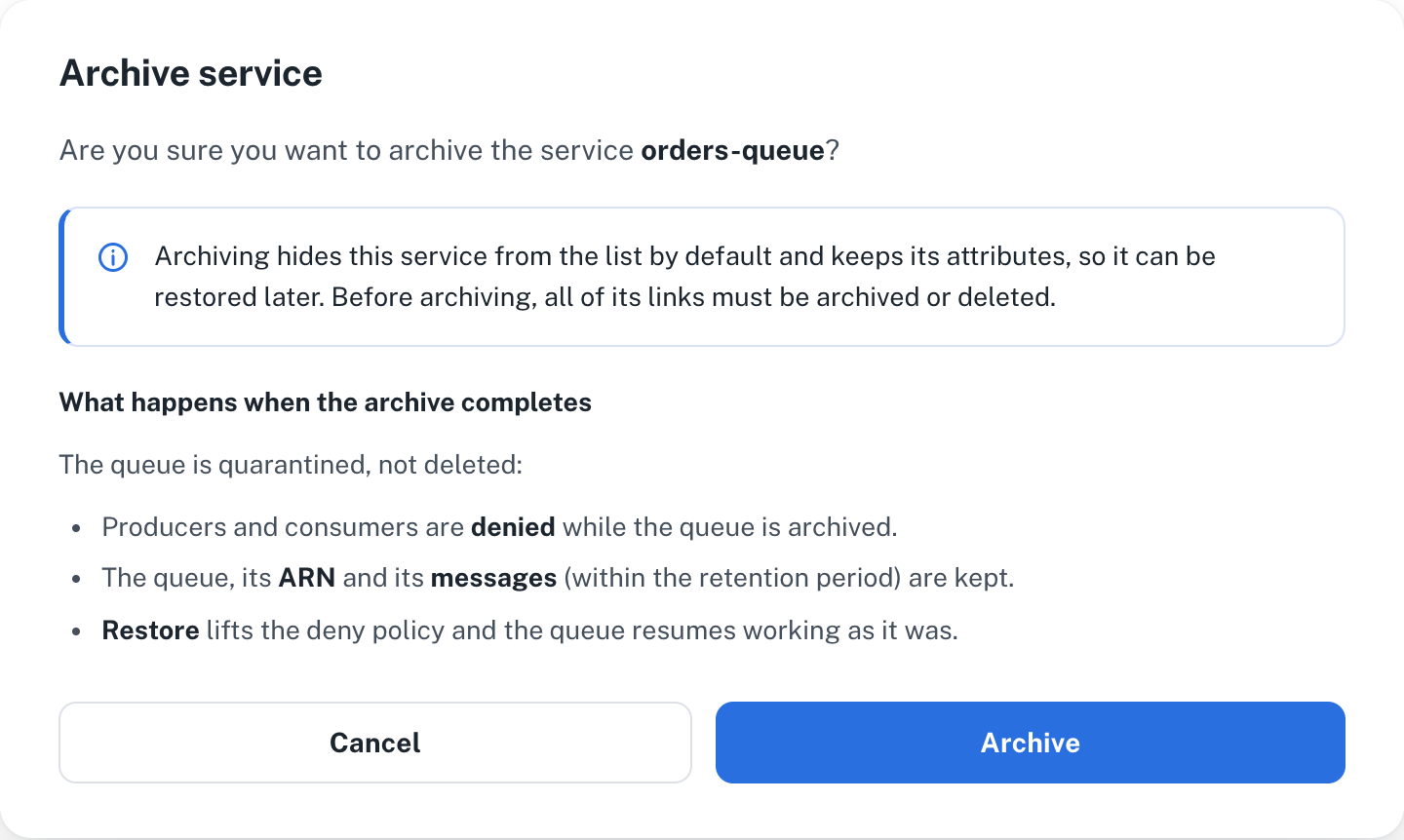
"Archive" means something different for every specification. Archiving an SQS queue might quarantine it, while archiving a database might pause it. Developers don't see any of that from the confirmation dialog: on its own, it only tells them that the service will be hidden from the list and can be restored later.
As the specification author, you decide what else that dialog says. The archive action's parameters schema can carry a uiSchema with a markdown label, and the Development view renders it inside the archive confirmation, right below nullplatform's built-in message. The developer reads what will happen to that particular service before confirming, without leaving the dialog. The Platform settings dialogs don't render it yet: they show only the built-in message.
What developers see
The dialog has two parts. The message at the top is nullplatform's, and you can't change it. Everything below it is your label, rendered from the action specification:
Add the explanation to the archive action
This works on agent-backed specifications (use_default_actions: false), where you author the action's content. The explanation lives in the parameters.schema of the archive action specification. Set it when you create the action, or update the action if it already exists:
- UI
- CLI
- cURL
-
Go to Platform settings and open Services → Specifications.
-
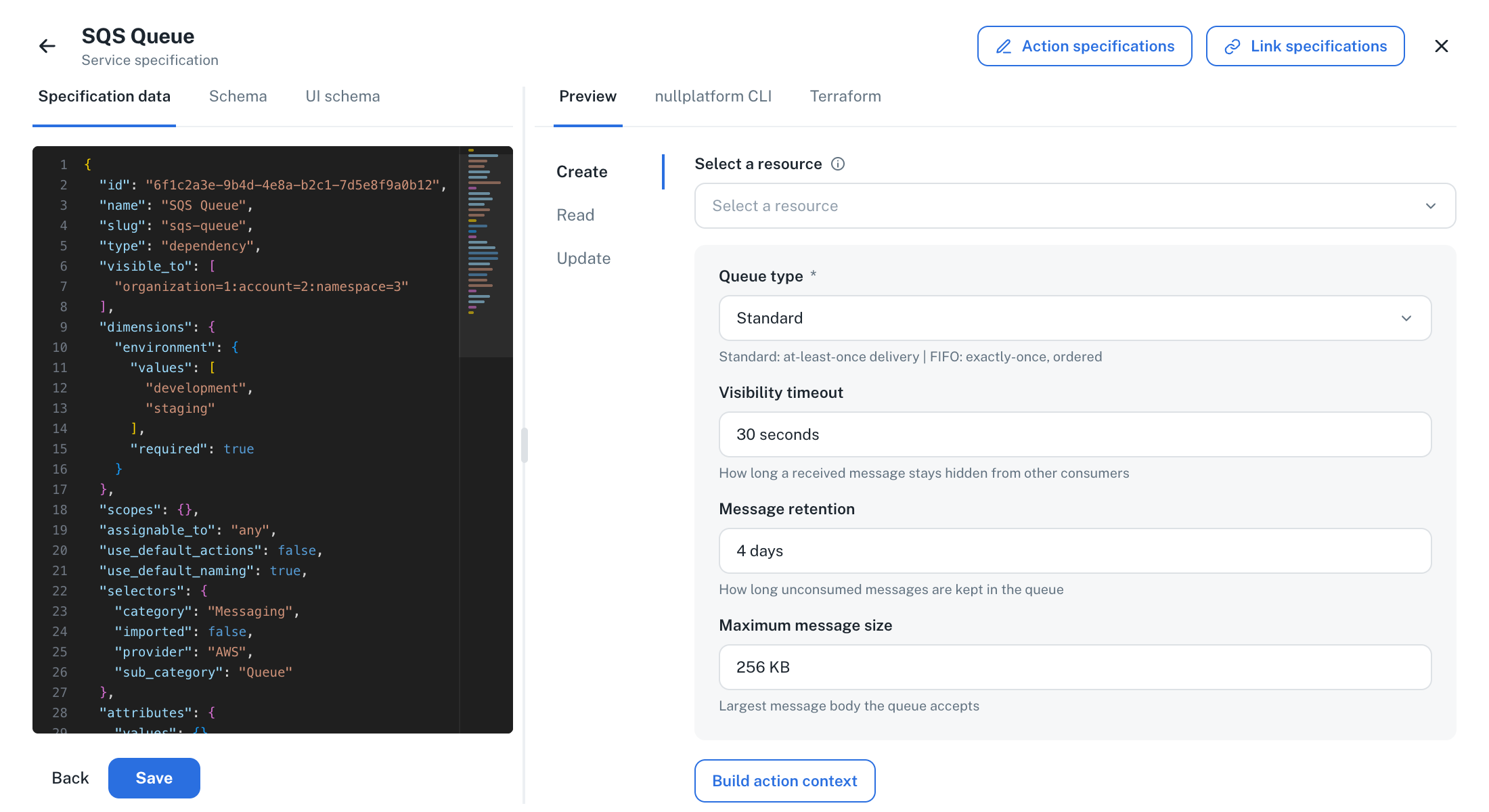
Click New service specification, or open the specification you want to edit. You land on the specification view: the JSON editor on the left, and a preview of what developers get on the right.
-
Click Action specifications at the top right. Then click New action specification, or open the existing
archiveaction from the list. -
Fill in the three editor tabs. In Specification data, name the action and set its type. Leave
resultsandparametersas the editor shows them: the parameters schema is edited in the next two tabs.{
"name": "Archive queue",
"type": "archive"
}In Schema, declare an object with no properties:
{
  "type": "object",
  "properties": {}
}
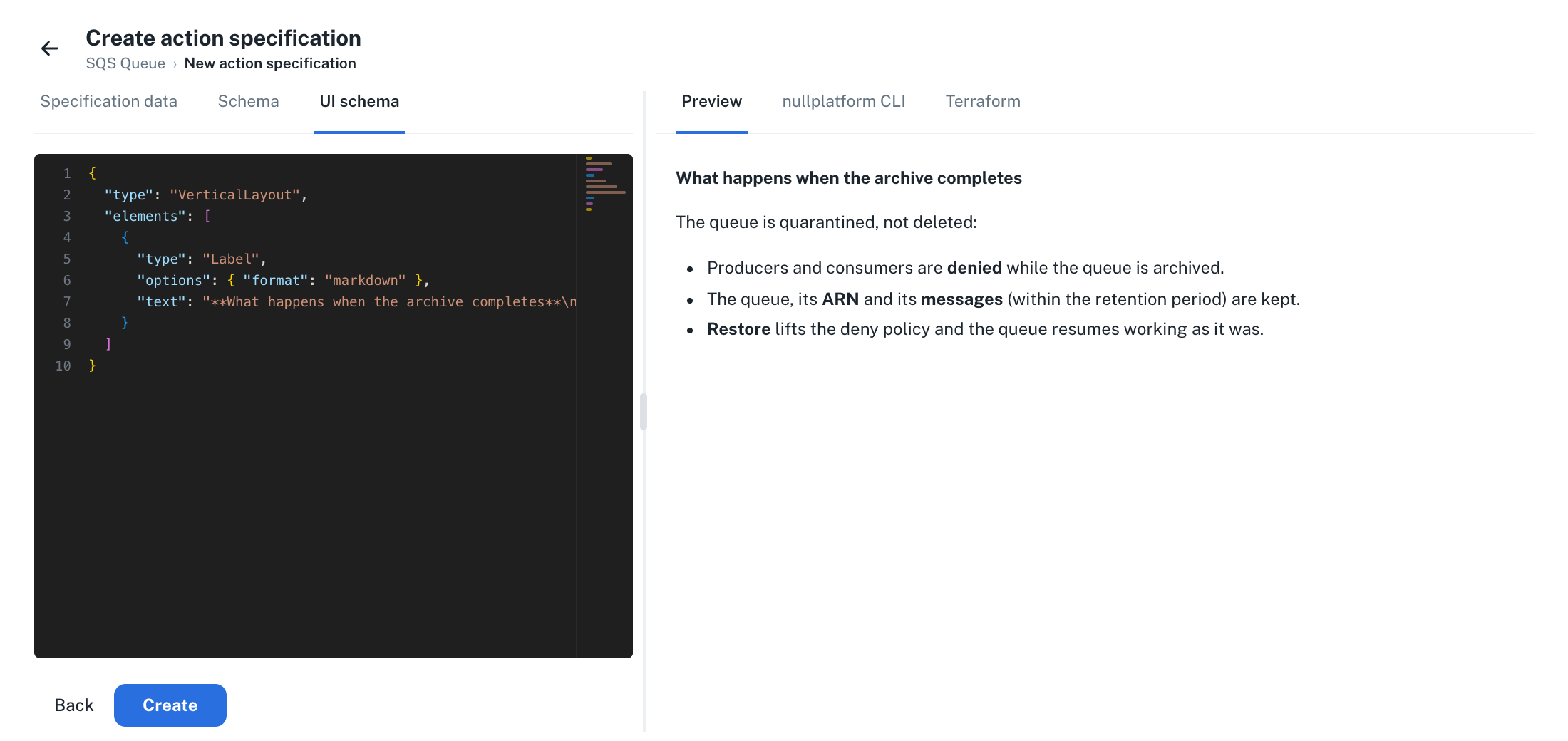
In UI schema, paste the layout with your label:
{
  "type": "VerticalLayout",
  "elements": [
    {
      "type": "Label",
      "options": { "format": "markdown" },
      "text": "**What happens when the archive completes**\n\nThe queue is quarantined, not deleted:\n\n- Producers and consumers are **denied** while the queue is archived.\n- The queue, its **ARN** and its **messages** (within the retention period) are kept.\n- **Restore** lifts the deny policy and the queue resumes working as it was."
    }
  ]
} -
Check the Preview tab on the right: it renders your text the way the confirmation dialog will. Click Create, or Save if you're editing an existing action.
Create the archive action with the explanation in its parameters schema:
np service specification action specification create \
  --serviceSpecificationId <SPEC_ID> \
  --body '{
    "name": "Archive queue",
    "type": "archive",
    "parameters": {
      "schema": {
        "type": "object",
        "properties": {},
        "uiSchema": {
          "type": "VerticalLayout",
          "elements": [
            {
              "type": "Label",
              "options": { "format": "markdown" },
              "text": "**What happens when the archive completes**\n\nThe queue is quarantined, not deleted:\n\n- Producers and consumers are **denied** while the queue is archived.\n- The queue, its **ARN** and its **messages** (within the retention period) are kept.\n- **Restore** lifts the deny policy and the queue resumes working as it was."
            }
          ]
        }
      },
      "values": {}
    }
  }'
If the archive action already exists, patch its parameters instead. List the specification's actions to find its ID:
np service specification action specification list \
  --serviceSpecificationId <SPEC_ID>
np service specification action specification patch \
  --serviceSpecificationId <SPEC_ID> \
  --id <ACTION_SPEC_ID> \
  --body '{
    "parameters": {
      "schema": {
        "type": "object",
        "properties": {},
        "uiSchema": {
          "type": "VerticalLayout",
          "elements": [
            {
              "type": "Label",
              "options": { "format": "markdown" },
              "text": "**What happens when the archive completes**\n\nThe queue is quarantined, not deleted:\n\n- Producers and consumers are **denied** while the queue is archived.\n- The queue, its **ARN** and its **messages** (within the retention period) are kept.\n- **Restore** lifts the deny policy and the queue resumes working as it was."
            }
          ]
        }
      },
      "values": {}
    }
  }'
Create the archive action with the explanation in its parameters schema:
curl -L -X POST 'https://api.nullplatform.com/service_specification/<SPEC_ID>/action_specification' \
-H 'Content-Type: application/json' \
-H 'Authorization: Bearer <token>' \
-d '{
  "name": "Archive queue",
  "type": "archive",
  "parameters": {
    "schema": {
      "type": "object",
      "properties": {},
      "uiSchema": {
        "type": "VerticalLayout",
        "elements": [
          {
            "type": "Label",
            "options": { "format": "markdown" },
            "text": "**What happens when the archive completes**\n\nThe queue is quarantined, not deleted:\n\n- Producers and consumers are **denied** while the queue is archived.\n- The queue, its **ARN** and its **messages** (within the retention period) are kept.\n- **Restore** lifts the deny policy and the queue resumes working as it was."
          }
        ]
      }
    },
    "values": {}
  }
}'
If the archive action already exists, update its parameters instead. List the specification's actions to find its ID:
curl -L 'https://api.nullplatform.com/service_specification/<SPEC_ID>/action_specification' \
-H 'Authorization: Bearer <token>'
curl -L -X PATCH 'https://api.nullplatform.com/service_specification/<SPEC_ID>/action_specification/<ACTION_SPEC_ID>' \
-H 'Content-Type: application/json' \
-H 'Authorization: Bearer <token>' \
-d '{
  "parameters": {
    "schema": {
      "type": "object",
      "properties": {},
      "uiSchema": {
        "type": "VerticalLayout",
        "elements": [
          {
            "type": "Label",
            "options": { "format": "markdown" },
            "text": "**What happens when the archive completes**\n\nThe queue is quarantined, not deleted:\n\n- Producers and consumers are **denied** while the queue is archived.\n- The queue, its **ARN** and its **messages** (within the retention period) are kept.\n- **Restore** lifts the deny policy and the queue resumes working as it was."
          }
        ]
      }
    },
    "values": {}
  }
}'
Whichever path you take, three things make this work:
- Empty
properties. The archive action doesn't need input from the developer, so the schema declares no fields. The dialog only shows your text. - A
Labelelement withoptions.formatset tomarkdown. That's what turns thetextinto a heading, a paragraph, and a list. Without the format option, a label renders as a plain heading, which only suits short titles. - A
textthat answers the developer's question. Say what happens to the underlying resource, what is kept, and what restore does. Write it for the person about to click Archive, not for whoever operates the module.
Link specifications work the same way through their own action specifications: the label shows up when a developer archives a link from the service's links list.
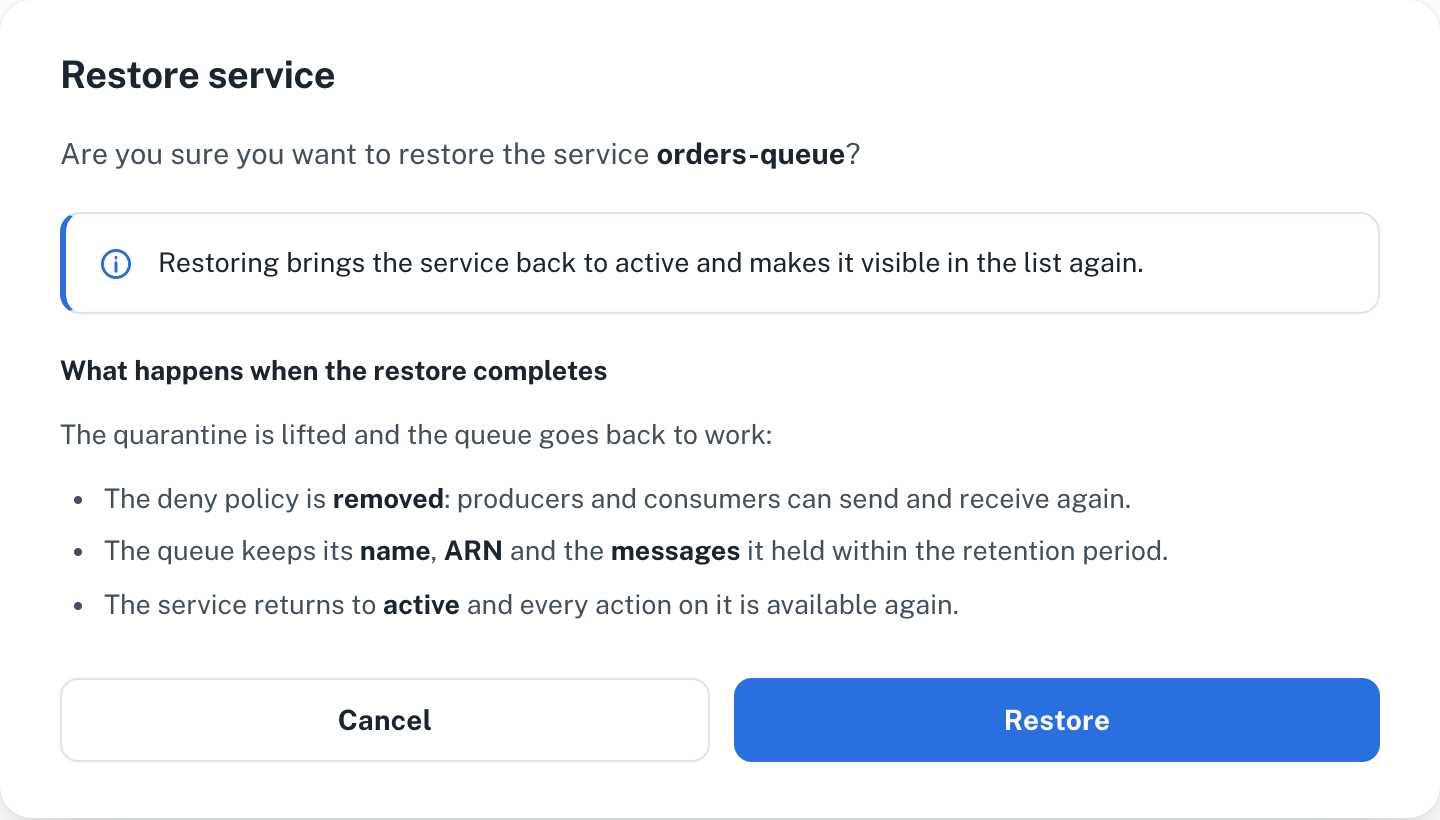
Cover the restore too
Give your unarchive action its own label describing what restore does, so both directions explain themselves. The restore confirmation renders it the same way:
Keep in mind
- The
uiSchemahere is the same UI schema every action form uses, and the dialog renders it with the same form engine. Labels are just one element type: layouts, controls bound to your parameter properties, and the rest of the UI elements work too. - The dialog renders the whole parameters schema. If your action also declares parameter properties, the confirmation shows those fields too and sends the values as the action's parameters.
- On specifications published as a versioned package, the explanation is frozen with the rest of the action's content: each instance shows the copy from its pinned package revision. Publish a new revision for updated text to reach existing instances.
- Specifications using default actions can't carry a custom explanation: nullplatform generates and owns their action content, and the dialog shows only the built-in message.
Implement archive in your service workflows
For agent-backed services, archive and unarchive actions run through the same workflow and in the same working directory as your create and update actions. Archive is one more state your module applies, not a separate code path: the same apply runs, and your code decides what "archived" means for the underlying resource.
A typical pattern:
- Derive an
archivedflag in your module from the action being executed, falling back to the service's status so that a later update doesn't accidentally un-archive the resource. - Use that flag to apply the archived state conditionally. For example, an SQS queue module can attach a queue policy that denies sending and receiving messages while archived. The queue keeps its name, ARN, and messages; restoring removes the policy.
- Remember that archive and unarchive actions don't carry creation parameters. If your module reads inputs from action parameters, resolve them from stored state or outputs when parameters are empty.
Make sure every execution path of your service treats archive and unarchive as an apply. If your automation only maps known action types and defaults everything else to a plan or a no-op, an archive action will report success without touching your infrastructure.
Deploy your workflow changes before you create the archive and unarchive action specifications. If the actions exist first, archiving runs an apply with no changes: the service ends up marked as archived while your infrastructure stays untouched.
Related docs
- Manage and provision services: provision services and link them to your applications
- Action specifications: define the actions a specification exposes
- Craft a service: build and publish your own service specifications
- Special schema keys and UI schema: design the forms and labels your actions render