Create a notification channel
This is the final step in the agent setup. The agent is installed and registered, but it stays idle until you connect it to platform events. A notification channel defines which events the agent listens to and what it runs in response.
Create a channel
Create a channel to define your agent’s response to platform events.
Supported types
You can configure the channel using either of these types:
type: agent: (Default) Executes a local script through the agenttype: http: ends a request to a remote HTTP handler
Prerequisites
- The agent installed. See Install the agent.
- An new API key also with Agent and Ops roles. See Authenticate the agent.
Example: Trigger a script on service events
This channel listens for service events and runs a local script inside your environment:
- UI (Recommended)
- CLI
- cURL
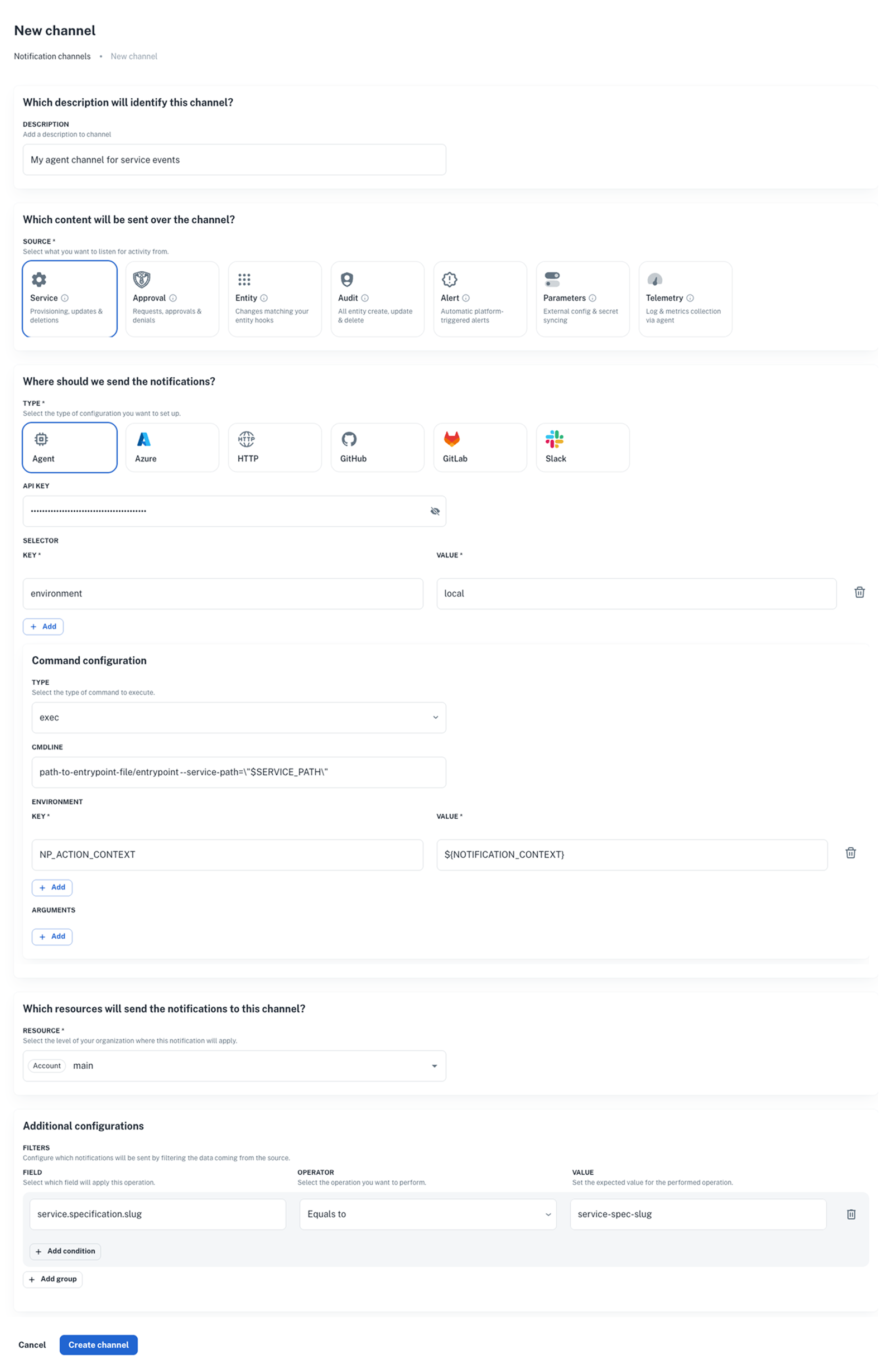
- Go to Platform settings > Notifications > Channels and click + New channel.
- Set the source (e.g., Service).
- Select agent as the type (or http for HTTP channels).
- Fill in configuration, then click Create channel.
np notification channel create \
--body '{
    "nrn": "organization=1:account=2:namespace=3:application=4",
    "source": [
        "service"
    ],
    "description": "My agent channel for service events",
    "type": "agent",    // or "http" for HTTP channels
    "configuration": {
        "api_key": "AAAA.1234567890abcdef1234567890abcdefPTs=",
        "command": {
            "type": "exec",
            "data": {
                "cmdline": "path-to-entrypoint-file/entrypoint --service-path=\"$SERVICE_PATH\"",
                "environment": {
                    "NP_ACTION_CONTEXT": "${NOTIFICATION_CONTEXT}"
                }
            },
        },
        "selector": {
            "environment": "local"
        }
    },
    "filters": {
        "service.specification.slug": "$service-spec-slug"
    }
}'
curl -L 'https://api.nullplatform.com/notification/channel' \
-H 'Content-Type: application/json' \
-H 'Accept: application/json' \
-H 'Authorization: Bearer <token>' \
-d '{
    "nrn": "organization=1:account=2:namespace=3:application=4",
    "source": [
        "service"
    ],
    "description": "My agent channel for service events",
    "type": "agent",    // or "http" for HTTP channels
    "configuration": {
        "api_key": "AAAA.1234567890abcdef1234567890abcdefPTs=",
        "command": {
            "data": {
                "cmdline": "path-to-entrypoint-file/entrypoint --service-path=\"$SERVICE_PATH\"",
                "environment": {
                    "NP_ACTION_CONTEXT": "${NOTIFICATION_CONTEXT}"
                }
            },
            "type": "exec"
        },
        "selector": {
            "environment": "local"
        }
    },
    "filters": {
        "service.specification.slug": "$service-spec-slug"
    }
}'
Example: Trigger a script for telemetry actions
If you want to handle telemetry events (logs, metrics, instances), set up an agent channel for telemetry events.
👉 See our dedicated documentation on telemetry for more details.
How it works
The diagram below shows the basic flow when a notification channel is triggered:
What happens step by step
- Nullplatform emits an event (e.g., service deployed).
- A notification channel forwards the event to your infrastructure’s agent.
- The agent runs the configured script or handler.
- The script executes locally, inside your infrastructure.
- The agent optionally returns logs or results to nullplatform.